<?xml version="1.0" encoding="utf-8"?><feed xmlns="http://www.w3.org/2005/Atom" ><generator uri="https://jekyllrb.com/" version="3.10.0">Jekyll</generator><link href="https://burkeholland.github.io/feed.xml" rel="self" type="application/atom+xml" /><link href="https://burkeholland.github.io/" rel="alternate" type="text/html" /><updated>2026-07-24T14:33:26+00:00</updated><id>https://burkeholland.github.io/feed.xml</id><title type="html">Burke Holland</title><subtitle>Mid brain takes on the world of software development.</subtitle><entry><title type="html">About That Scary AI Graphic That’s Been Going Around</title><link href="https://burkeholland.github.io/posts/about-that-scary-ai-graphic/" rel="alternate" type="text/html" title="About That Scary AI Graphic That’s Been Going Around" /><published>2026-03-06T12:18:00+00:00</published><updated>2026-03-06T12:18:00+00:00</updated><id>https://burkeholland.github.io/posts/about-that-scary-ai-graphic</id><content type="html" xml:base="https://burkeholland.github.io/posts/about-that-scary-ai-graphic/"><![CDATA[<p>There’s a graphic making the rounds right now. You’ve probably seen it. It’s a radar chart showing the difference between what AI <em>theoretically</em> could do across various job categories versus what people are actually using it for.</p>

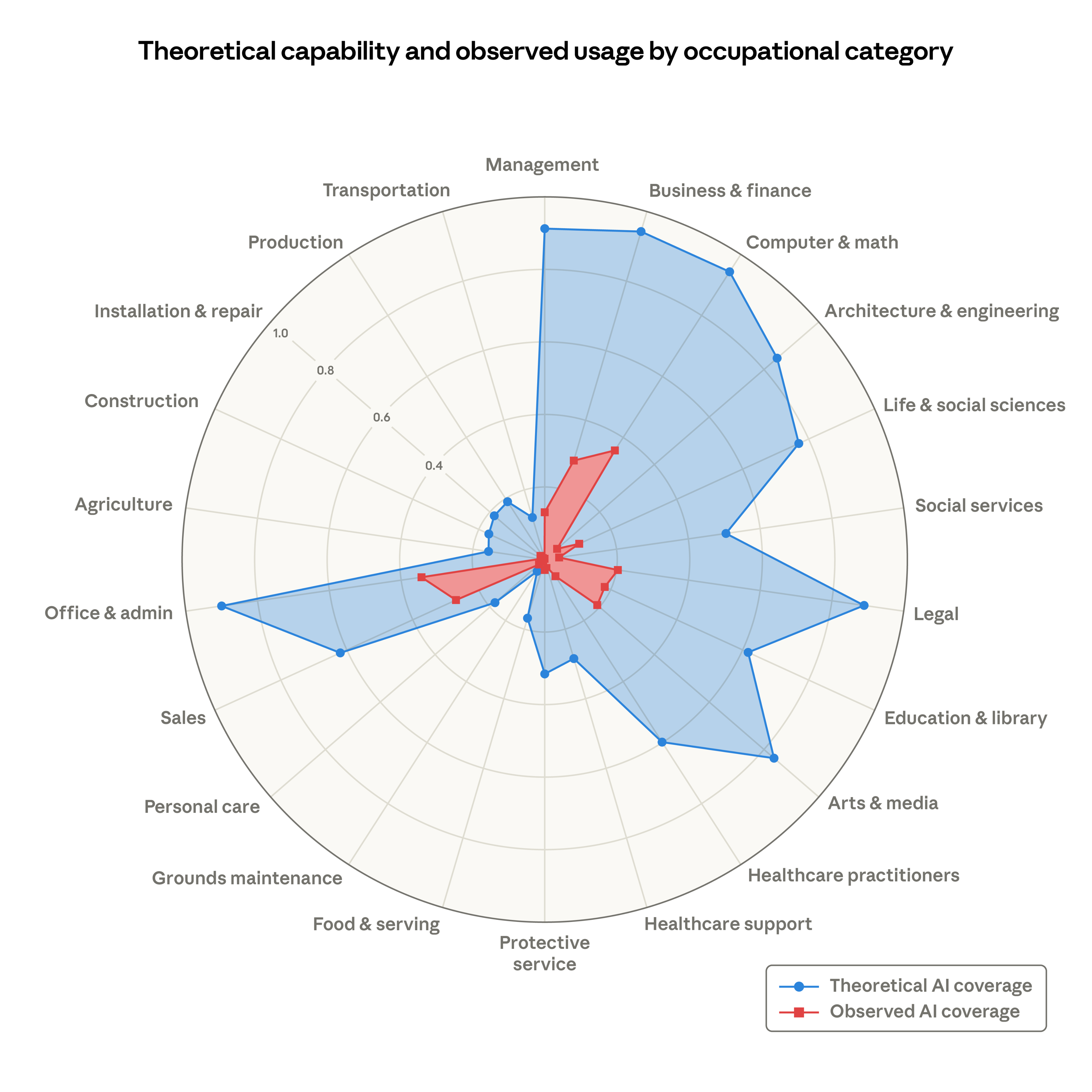
<p>It’s striking. The gap between the two is enormous.</p>

<p>And it’s a little scary.</p>

<div style="text-align: center;">
  <a href="https://www.anthropic.com/research/labor-market-impacts" target="_blank" rel="noopener">
    <img src="/assets/images/ai-capability-chart.png" alt="Radar chart showing theoretical AI capability vs observed AI usage across occupational categories" style="max-width: 600px; width: 100%; height: auto;" />
  </a>
</div>

<p><em>(<a href="https://www.anthropic.com/research/labor-market-impacts">Source: Anthropic — Labor market impacts of AI: A new measure and early evidence</a>)</em></p>

<p>The chart shows two overlapping shapes - a large blue area representing AI’s potential and a small orange/amber area representing current AI usage - plotted across categories like Cognitive/Analytical, Creative, Technical, Administrative, Interpersonal/Social, and Physical/Dexterous tasks. The potential area dwarfs the current usage one. It looks like the current usage shape is cowering inside the potential one.</p>

<p>The implication is clear: AI can do <em>way</em> more than we’re using it for. And the visual is effective. You look at it and think, “oh no.”</p>

<h2 id="why-would-a-company-release-this">Why would a company release this?</h2>

<p>That’s the first question worth asking. Why would a company release something like this? Is it because they’re ethical and want to warn us? Are they doing us a public service?</p>

<p>That’s how it <em>feels</em>, right? Like they’re being transparent. Like they’re the responsible ones - showing us the truth even though the truth is uncomfortable. You might even admire them for it.</p>

<p>Hold that thought.</p>

<h2 id="you-are-always-being-sold-to">You are always being sold to</h2>

<p>We have to remember something: we are always being sold to. Always. Every company exists to make a profit. That’s not a criticism - that’s just what the market demands. Companies that don’t grow, die.</p>

<p>But some companies are <em>so</em> good at marketing that you don’t even realize it’s happening. The best ones make it feel like a public service. Like they’re just trying to help. Like they’re the good guys, sharing research with the world out of the goodness of their hearts.</p>

<p>You might even admire them for it. And that’s exactly when you should be paying the most attention.</p>

<h2 id="lets-actually-look-at-this-graphic">Let’s actually look at this graphic</h2>

<p>Because once you stop reacting to it emotionally and start looking at what it’s actually <em>doing</em>, it gets interesting.</p>

<p><strong>The word “theoretical” is doing a lot of heavy lifting.</strong> It sounds humble. Scientific. Measured. But theoretical capability is defined <em>by the company that made the chart</em>, based on what their own models can do. They decided what counts as “capability.” They drew the blue line.</p>

<p>That’s not research. That’s a company mapping its own total addressable market and putting it in a chart.</p>

<p><strong>The gap is the point.</strong> That huge space between the blue shape and the red shape? That’s not a warning. It’s a sales pitch. To businesses, it says: “your competitors could be using AI for Legal, Healthcare, Engineering - and they’re not yet. But they will be. Better move fast.” To workers, it says: “AI can theoretically do your job. Are you paying attention?”</p>

<p>That anxiety? It drives adoption. Which drives revenue.</p>

<p><strong>It’s a land-grab narrative dressed as research.</strong> The chart positions the company as the authority on what AI can and can’t do - across every industry, every job function. That’s a bold claim to stake out. And it’s presented not as marketing, but as a sober assessment. A public service.</p>

<p>Here’s the translation: what they want you to believe is that the gap represents <em>opportunity</em>. What it actually represents is their TAM - their total addressable market - illustrated as a helpful infographic.</p>

<h2 id="youre-always-being-sold-to">You’re always being sold to</h2>

<p>I’m not saying the data is fake. I’m not saying AI isn’t capable. It clearly is. I use it every day and it’s genuinely powerful.</p>

<p>But never forget that you’re always being sold to. When companies make decisions - when contracts are refused publicly, when graphics are released, when executives give interviews making scary predictions about the future - those things are not done without ulterior motive. They are strategic. They are calculated. They are not done in a vacuum.</p>

<p>That’s not cynicism. That’s just how markets work. Companies are obligated to grow. Their investors demand it. And that’s fine.</p>

<p>But as people, we should stay on our toes. Remain skeptical. When you see something that makes you feel anxious or urgent or like you need to <em>act now</em>, ask yourself one question:</p>

<p><strong>Who benefits from me believing this?</strong></p>

<p>You are always being sold to.</p>

<hr />

<p><em>This post was dictated by a human and edited by Claude Opus 4.6</em></p>]]></content><author><name></name></author><category term="posts" /><summary type="html"><![CDATA[There’s a graphic making the rounds right now. You’ve probably seen it. It’s a radar chart showing the difference between what AI theoretically could do across various job categories versus what people are actually using it for.]]></summary><media:thumbnail xmlns:media="http://search.yahoo.com/mrss/" url="https://burkeholland.github.io/assets/images/banners/about-that-scary-ai-graphic.jpg" /><media:content medium="image" url="https://burkeholland.github.io/assets/images/banners/about-that-scary-ai-graphic.jpg" xmlns:media="http://search.yahoo.com/mrss/" /></entry><entry><title type="html">We Don’t Know What’s Out There</title><link href="https://burkeholland.github.io/posts/we-dont-know-whats-out-there/" rel="alternate" type="text/html" title="We Don’t Know What’s Out There" /><published>2026-03-03T19:23:00+00:00</published><updated>2026-03-03T19:23:00+00:00</updated><id>https://burkeholland.github.io/posts/we-dont-know-whats-out-there</id><content type="html" xml:base="https://burkeholland.github.io/posts/we-dont-know-whats-out-there/"><![CDATA[<p>The astronauts who circled the moon in 1968 could still see Earth. They were farther from home than anyone had ever been, but when they looked back, there it was - blue and white and impossibly fragile against the black. They knew the math. They knew the trajectory would bring them home. But they’d never actually <em>been</em> that far before. Beyond low Earth orbit, past the point where you could fix things if they went wrong.</p>

<p>That’s where we are with AI and software development. We can see what’s coming. We know the trajectory. But we’ve never actually been there before.</p>

<h2 id="the-fear-is-real">The fear is real</h2>

<p>Right now, the primary job of every developer is to automate what they’re doing - to figure out how to build systems that are verifiable, safe, and reliable. There’s still enormous work to do there. But given the pace, we’re probably six months from prototypes of fully automated AI development teams. Maybe twelve months from it being the norm.</p>

<p>The anxiety: <strong>what happens to developers after that?</strong></p>

<p>The assumption is simple: we automate ourselves out of a job. We keep talking about AI replacing developers, but the pace has gotten so fast that the question isn’t “if” anymore - it’s “when.” And probably “soon.”</p>

<p>But here’s the thing. We don’t actually know what happens next. Because we’ve never been here before.</p>

<h2 id="what-automation-actually-does">What automation actually does</h2>

<p>Every time we’ve automated something fundamental, we’ve been terrified. And every time, we’ve been wrong about what would happen.</p>

<p><strong>ATMs and bank tellers.</strong> When ATMs arrived in the 1970s, everyone knew what would happen: no more tellers. Why would you need humans to dispense cash when a machine could do it 24/7? Except that’s not what happened. Teller headcount <em>increased</em>. Banks could open more branches cheaply because they didn’t need as many tellers per branch. And tellers moved from dispensing cash to relationship banking - helping people with loans, mortgages, financial planning. Their job got better.</p>

<p><strong>Spreadsheets and accountants.</strong> VisiCalc launched in 1979. It was supposed to eliminate accountants. Why would you need people to add numbers when a computer could do it instantly? Instead, the number of accountants grew. Cheap calculation created <em>more demand</em> for financial thinking. The job became analysis instead of arithmetic. The tedious part got automated, and suddenly everyone needed someone who could actually <em>understand</em> the numbers.</p>

<p><strong>Compilers and assembly programmers.</strong> High-level languages were going to replace low-level coders. Why write in assembly when COBOL or C could do it for you? Instead, they expanded who could program. The whole industry exploded. And the people who understood the fundamentals - who knew what was actually happening under the hood - became more valuable than ever.</p>

<p><img src="/assets/images/earth-from-apollo8.jpg" alt="View of Earth rising over the lunar horizon, taken from Apollo 8" />
<em>Earthrise from Apollo 8, December 1968. Photo: <a href="https://commons.wikimedia.org/wiki/File:NASA-Apollo8-Dec24-Earthrise.jpg">NASA/Bill Anders</a>, Public Domain</em></p>

<p>The pattern is consistent: automation doesn’t eliminate jobs. It <strong>elevates</strong> them. The tedious part gets automated. The interesting part expands. The problem is we can’t see what “the interesting part” is yet. We’re still in orbit, looking at the trajectory, trying to imagine what’s on the other side.</p>

<h2 id="three-things-developers-might-actually-do">Three things developers might actually do</h2>

<p>If AI truly owns implementation - if code generation becomes commoditized and reliable - what becomes valuable? Here are three possibilities. Not predictions. Just hypotheses for what’s beyond orbit.</p>

<h3 id="1-outcome-architects">1. Outcome architects</h3>

<p>Right now we spend most of our time on implementation. Writing code, debugging, refactoring, getting tests to pass. Once AI owns that, the valuable skill becomes <strong>knowing what to build</strong>.</p>

<p>Not “what features should this have?” - AI can help with that. But precise problem definition. Deep understanding of users and domains. Specifying outcomes well enough that AI can execute them correctly. Knowing <em>why</em> you’re building something and what success actually looks like.</p>

<p>This is harder than coding. Most developers are bad at it today because they could always hide in the implementation. “I don’t know exactly what we need, but I’ll figure it out as I build” worked when you were the one building. It doesn’t work when you need to specify upfront.</p>

<p>The people who can clearly articulate problems, understand domains deeply, and communicate precisely with AI systems - those people become more valuable, not less.</p>

<h3 id="2-ai-system-auditors">2. AI system auditors</h3>

<p>Someone has to verify that AI-generated systems are correct, safe, not subtly broken at scale. This is a new discipline. Not QA in the old sense - more like understanding emergent behaviors in complex systems.</p>

<p>When AI writes a million lines of code in a day, you can’t audit it the way you’d review a pull request. You need to understand system-level properties. You need to know what “correct” even means in contexts where requirements are ambiguous. You need to spot the kinds of mistakes that pass tests but break in production.</p>

<p>The more we automate, the more critical this becomes. Right now we catch bugs by writing code carefully. When AI writes code instantly, verification becomes the bottleneck. The people who can do that well - who can look at a system and know whether it’s trustworthy - that’s a skill that doesn’t exist yet but will absolutely be necessary.</p>

<h3 id="3-the-impossible-backlog">3. The impossible backlog</h3>

<p>There are enormous problems humanity hasn’t solved because they were too expensive to tackle. Not because we didn’t have ideas - because we didn’t have implementation capacity.</p>

<p>When software cost approaches zero, developers go after problems that seemed absurdly ambitious. Personalized healthcare coordination for everyone. Real-time climate system monitoring and intervention. Scientific discovery pipelines that actually scale. Tools so customized to specific workflows that nobody would have bothered building them before.</p>

<p>We’ve been bottlenecked by the cost of building. Remove that bottleneck and suddenly there’s work that couldn’t exist before. Not replacing what developers did - unlocking what was always impossible.</p>

<h2 id="we-dont-know-the-ceiling">We don’t know the ceiling</h2>

<p>The Apollo 8 astronauts were afraid. Of course they were. They were going farther than anyone had gone. They couldn’t see what was on the other side of the moon until they got there.</p>

<p>But they went. And they found out there <em>was</em> another side.</p>

<p>We’re afraid of what automation means for developers. The fear is rational. The transition will be hard. Some jobs won’t survive - that’s true of every major shift. But we’ve consistently been wrong about this before. We thought ATMs would eliminate tellers. We thought spreadsheets would eliminate accountants. We thought compilers would eliminate programmers.</p>

<p>What actually happened was the job <strong>changed</strong>. The tedious part got automated. The ceiling got higher. The work got more interesting.</p>

<p>Maybe this time is different. Maybe AI really does eliminate the need for human developers entirely. But we don’t actually know that. We’ve never been here before.</p>

<p>We’re in orbit, looking at the trajectory, trying to imagine what’s beyond. We can see home from here. We know the math. But out there?</p>

<p>We’ve never left orbit.</p>

<hr />

<p><em>This post was dictated by a human and edited by Claude Sonnet 4.6</em></p>]]></content><author><name></name></author><category term="posts" /><summary type="html"><![CDATA[The astronauts who circled the moon in 1968 could still see Earth. They were farther from home than anyone had ever been, but when they looked back, there it was - blue and white and impossibly fragile against the black. They knew the math. They knew the trajectory would bring them home. But they’d never actually been that far before. Beyond low Earth orbit, past the point where you could fix things if they went wrong.]]></summary><media:thumbnail xmlns:media="http://search.yahoo.com/mrss/" url="https://burkeholland.github.io/assets/images/banners/we-dont-know-whats-out-there.jpg" /><media:content medium="image" url="https://burkeholland.github.io/assets/images/banners/we-dont-know-whats-out-there.jpg" xmlns:media="http://search.yahoo.com/mrss/" /></entry><entry><title type="html">Nothing Worth Remembering</title><link href="https://burkeholland.github.io/posts/nothing-worth-remembering/" rel="alternate" type="text/html" title="Nothing Worth Remembering" /><published>2026-02-28T16:43:00+00:00</published><updated>2026-02-28T16:43:00+00:00</updated><id>https://burkeholland.github.io/posts/cathedrals-and-strip-malls</id><content type="html" xml:base="https://burkeholland.github.io/posts/nothing-worth-remembering/"><![CDATA[<p>We don’t build cathedrals anymore. Do we even know how?</p>

<p>Think about the great cathedrals of Europe. Notre-Dame took nearly 200 years to complete. The Sagrada Família in Barcelona has been under construction since 1882 and <em>still</em> isn’t finished. These weren’t just buildings - they were generational projects. Craftsmen spent their entire careers perfecting a single rose window or buttress, knowing they’d never see the finished structure.</p>

<p><img src="/assets/images/notre-dame.jpg" alt="Notre-Dame Cathedral at sunrise, Paris" />
<em>Notre-Dame de Paris - nearly 200 years to build. Photo: <a href="https://commons.wikimedia.org/wiki/File:Cath%C3%A9drale_Notre-Dame_de_Paris,_20_March_2014.jpg">Daniel Vorndran</a>, CC BY-SA</em></p>
<p>Today? Churches meet in schools. Strip malls. Metal buildings with industrial carpet and folding chairs. Those are the structures we have now. And I’m not trying to be a snob about it - there’s nothing wrong with meeting in a school gym. But we’ve lost something in the process. We’ve traded <strong>craftsmanship</strong> for <strong>convenience</strong>.</p>

<p>We don’t build houses like cathedrals anymore, either. Even in wealthy areas, it’s just faster to throw them up quickly. Three months and you’ve got a house. Sure, it’s a house. But it’s not the kind where every piece of trim was hand-cut, every window frame precisely fitted, every decision deliberate.</p>

<p>The same thing is happening with software.</p>

<h2 id="the-age-of-handcrafted-software">The age of handcrafted software</h2>

<p>There was a time - not that long ago - when you could tell someone spent <em>months</em> building a website. Sites like <strong>Smashing Magazine</strong> and <strong>CSS-Tricks</strong> weren’t just informative, they were <em>beautiful</em>. Every interaction was considered. Every animation served a purpose. You could feel the care that went into them.</p>

<p>Or think about apps like <strong>Things</strong> on Mac. Or <strong>Tweetbot</strong> before Twitter killed third-party clients. These weren’t just functional - they had personality. Soul. Someone sat down and obsessed over every pixel, every transition, every micro-interaction.</p>

<p>Those were our cathedrals.</p>

<p>But now? When AI designs a website, you get one of two things: a purple gradient with glassmorphism, or something that looks like it was ripped directly from Twitter - color bar on the left, cards everywhere, way too much white space.</p>

<p>AIs are <strong>derivative</strong>. They have to be. They can only remix what they’ve seen before. They don’t have taste, or vision, or the ability to say “you know what would be <em>weird</em> but also kind of amazing?” They optimize for the average, for what works, for what’s been done before.</p>

<p>We’re standing up software in hours instead of months. But we’re not building cathedrals. We’re building tract homes and strip malls.</p>

<h2 id="the-trade-off-were-making">The trade-off we’re making</h2>

<p>Speed matters. It used to take a year to build a house - now you can do it in three months. It used to take months to build a decent web app - now you can do it in a weekend.</p>

<p>And yes, some of that is <strong>better tools</strong>. We invented power saws, nail guns, pneumatic framing nailers - tools that should have made houses <em>better</em>. And they could have. You can do things with a power saw that would take weeks by hand. But that’s not what happened. Instead of using those tools to build <em>more carefully</em>, we used them to build <em>more quickly</em>. The tools didn’t make the houses worse. They made building fast enough that worse became <em>good enough</em>.</p>

<p>Software followed the same arc. We got frameworks, component libraries, build systems that handle the tedious parts. Those are genuinely better tools. But the more powerful the tools get, the faster we throw things together - and the more willing we are to sacrifice quality. It’s like some law of nature: the easier it becomes to build something well, the less likely we are to bother.</p>

<p>The tools don’t degrade quality. They degrade the <strong>incentive</strong> for quality.</p>

<p>And now we’ve got the most powerful tool we’ve ever had - AI - and we’re using it to build the <strong>cheapest, simplest structures</strong> to get the job done. Because we can. Because it’s <em>efficient</em>. Because nobody wants to wait a year for a website when they can have one tomorrow.</p>

<p>Are we really better off?</p>

<p>Yes, it’s a house. Yes, it’s a church. Yes, it’s a functioning web application. But it’s devoid of <strong>personality</strong>. It lacks <strong>soul</strong>. There’s no culture, no craft, no evidence that anyone cared beyond “does it work?”</p>

<p>I mean, a church in a strip mall <em>works</em>. People show up, they worship, they find community. They might even love their church deeply. But nobody loves the <em>building</em>. Nobody drives past and thinks “wow, that’s beautiful.” Nobody takes photos in front of the beige stucco and the generic signage. The love is despite the aesthetics, not because of them.</p>

<h2 id="what-were-sacrificing">What we’re sacrificing</h2>

<p>AI makes it easy to build software. <em>Really</em> easy. And that’s not a bad thing - I’ve built apps in hours that would have taken me weeks before. I’m not standing here pretending I’m above it.</p>

<p>But we need to be careful. Because the more we optimize for speed and efficiency, the more we’re going to see the <strong>lowest tolerable quality</strong> become the norm. Not the lowest <em>possible</em> quality, but the lowest <em>tolerable</em>. The point where something works just well enough that nobody complains.</p>

<p>That’s the real danger. Not that AI will write bad code, but that it will write <strong>just-good-enough code</strong>. And we’ll get used to it. We’ll forget what the alternatives looked like. We’ll train a generation of developers who never experienced what it felt like to hand-craft something beautiful.</p>

<p>There will be more options. Things will be cheap. Everything will be <em>functional</em>.</p>

<p>But what are we sacrificing?</p>

<p>If we’re not careful, we’re going to look up one day and realize that we live in a world of strip malls and tract homes. Everything will look the same. Feel the same. We’ll have speed and efficiency and endless options.</p>

<p>And absolutely nothing worth remembering.</p>

<hr />

<p><em>This post was dictated by a human and edited by Claude Sonnet 4.6</em></p>]]></content><author><name></name></author><category term="posts" /><summary type="html"><![CDATA[We don’t build cathedrals anymore. Do we even know how?]]></summary><media:thumbnail xmlns:media="http://search.yahoo.com/mrss/" url="https://burkeholland.github.io/assets/images/banners/cathedrals-and-strip-malls.jpg" /><media:content medium="image" url="https://burkeholland.github.io/assets/images/banners/cathedrals-and-strip-malls.jpg" xmlns:media="http://search.yahoo.com/mrss/" /></entry><entry><title type="html">Opus 4.5 is going to change everything</title><link href="https://burkeholland.github.io/posts/opus-4-5-change-everything/" rel="alternate" type="text/html" title="Opus 4.5 is going to change everything" /><published>2026-01-05T08:40:00+00:00</published><updated>2026-01-05T08:40:00+00:00</updated><id>https://burkeholland.github.io/posts/opus-45</id><content type="html" xml:base="https://burkeholland.github.io/posts/opus-4-5-change-everything/"><![CDATA[<blockquote>
  <p>Edit: A lot of folks have been asking what worfklows I used to write these apps. I used GitHub Copilot in VS Code with a custom agent prompt that you’ll find toward the end of this post. Context7 was the only MCP I used. I mostly just used the built-in voice dictation feature and talked to Claude. No fancy workflows, planning, etc required. The agent harness in VS Code for Opus 4.5 is so good - you don’t need much else. And it’s remarkably fast. Also, if it’s not obvious, these are my opinions. I’m wrong like 50% of the time so proceed with caution.</p>
</blockquote>

<p><img src="/assets/headline1.png" alt="rediculous CEO quote about AI 1" /></p>

<p><img src="/assets/headline2.png" alt="rediculous CEO quote about AI 2" /></p>

<p><img src="/assets/headline3.png" alt="rediculous CEO quote about AI 3" /></p>

<p>If you had asked me three months ago about these statements, I would have said only someone who’s never built anything non-trivial would believe they’re true. Great for augmenting a developer’s existing workflow, and completions are powerful, but agents replacing developers entirely? No. Absolutely not.</p>

<p>Today, I think that AI coding agents can absolutely replace developers. And the reason that I believe this is Claude Opus 4.5.</p>

<h2 id="opus-45-is-not-normal">Opus 4.5 is not normal</h2>

<p>And by “normal”, I mean that it is not the normal AI agent experience that I have had thus far. So far, AI Agents seem to be pretty good at writing spaghetti code and after 9 rounds of copy / paste errors into the terminal and “fix it” have probably destroyed my codebase to the extent that I’ll be throwing this whole chat session out and there goes 30 minutes I’m never getting back.</p>

<p>Opus 4.5 feels to me like the model that we were promised - or rather the promise of AI for coding actually delivered.</p>

<p>One of the toughest things about writing that last sentence is that the immediate response from you should be, “prove it”. So let me show you what I’ve been able to build.</p>

<h3 id="project-1---windows-image-conversion-utility">Project 1 - Windows Image Conversion Utility</h3>

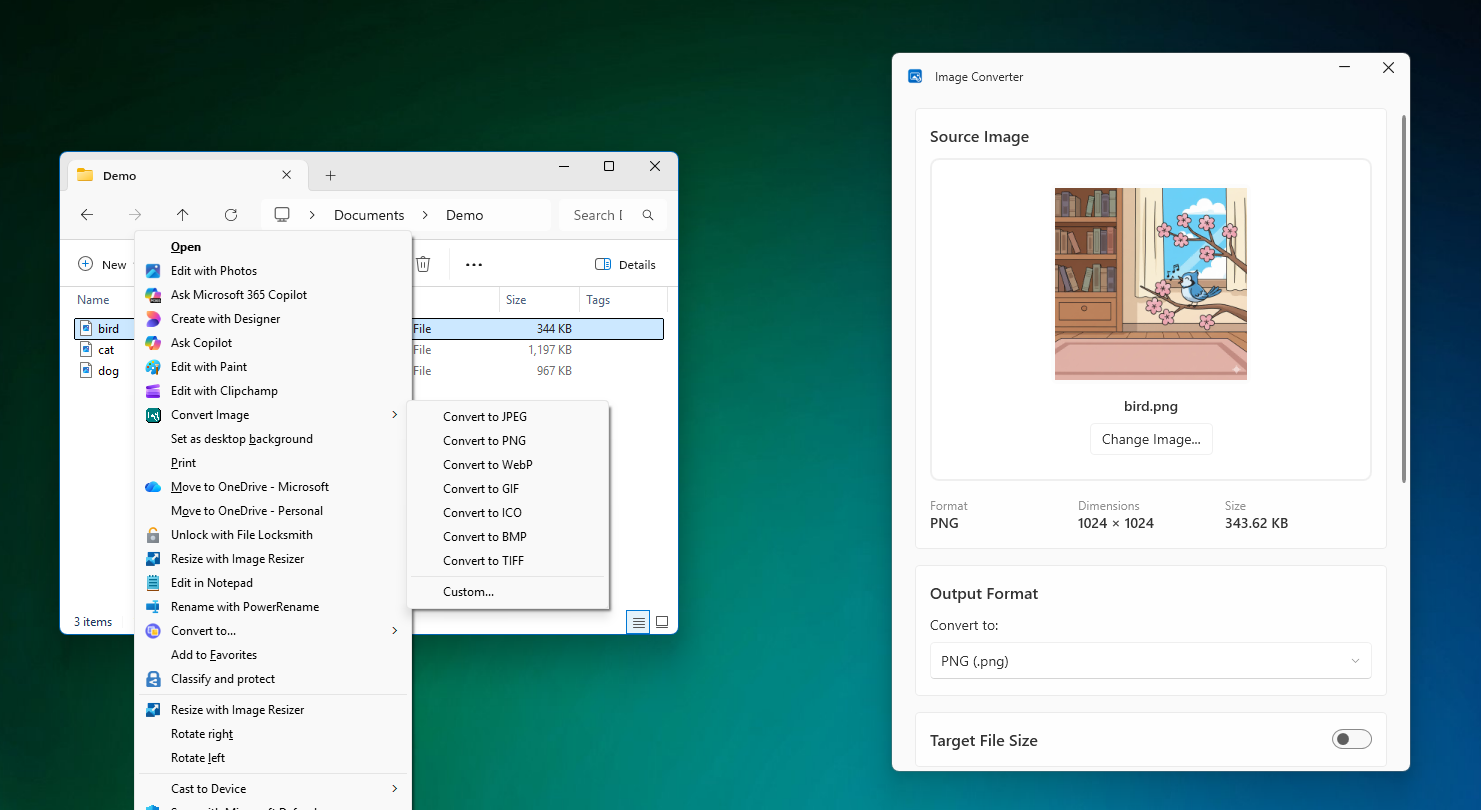
<p>I first noticed that Opus 4.5 was drastically different when I used it to build a Windows utility to right-click an image and convert it to different file types. This was basically a one shot build after asking Opus the best way to add a right-click menu to the file explorer.</p>

<p><img src="/assets/convert-me.png" alt="Convert me screenshots" /></p>

<p>What amazed me through the process of building this was Opus 4.5 ability to get most things right on the first try. And if it ran into errors, it would try and build using the dotnet CLI, read the errors and iterate until fixed. The only issue I had was Opus inability to see XAML errors, which I used Visual Studio to see and copy / paste back into the agent.</p>

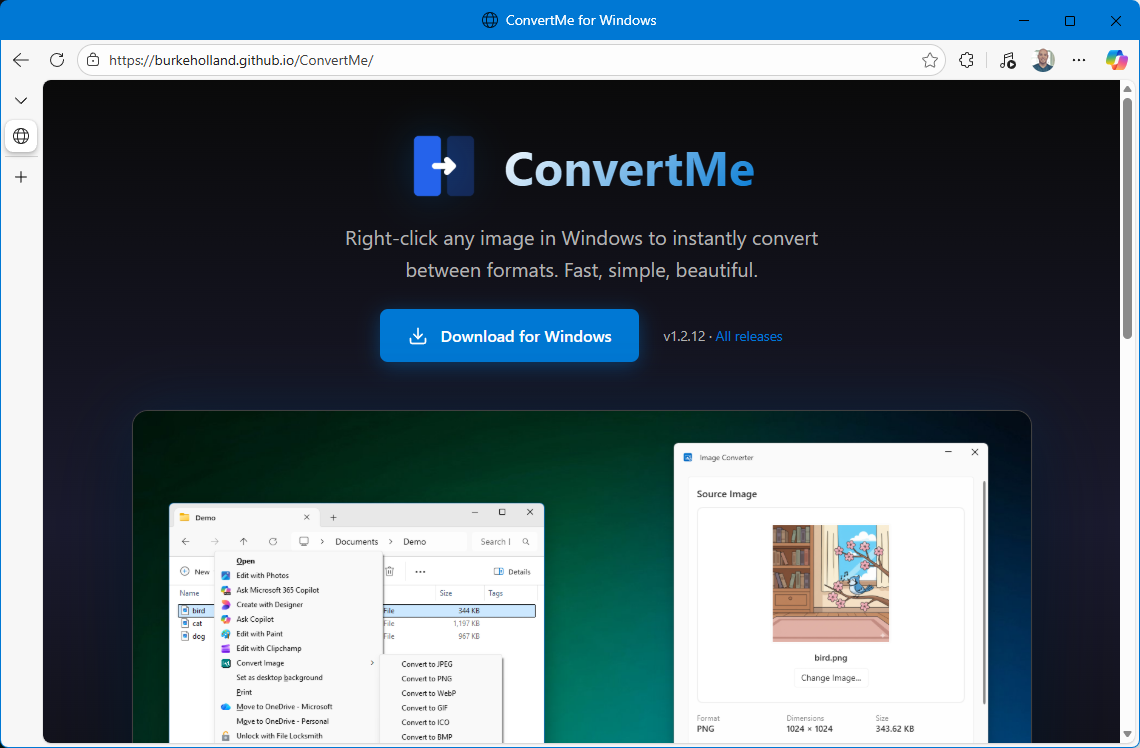
<p>Opus built a site for me to distribute it and handled the bundling of the executable so as to use a powershell script for the install, uninstall. It also built the GitHub Actions which do the release and update the landing page so that all I have to do is push source.</p>

<p><img src="/assets/convert-me-site.png" alt="Convert me site screenshot" /></p>

<p>The only place I had to use other tools was for the logo - where I used Figma’s AI to generate a bunch of different variations - but then Opus wrote the scripts to convert that SVG to the right formats for icons, even store distribution if I chose to do so.</p>

<p>Now this is admittedly not a complex application. This is a small Windows utility that is doing basically one thing. It’s not like I asked Opus 4.5 to build Photoshop.</p>

<p>Except I kind of did.</p>

<h3 id="project-2---screen-recording--editing">Project 2 - Screen recording / editing</h3>

<p>I was so impressed by Opus 4.5 work on this utility that I decided to make a simple GIF recording utility similar to LICEcap for Mac. Great app, questionable name.</p>

<p>But that proved to be so easy, that I went ahead and continued adding features, including capturing and editing video, static images, adding shapes, cropping, blurs and more. I’m still working on this application as it turns out building a full on image/video editor is kind of a big undertaking. But I got REALLY far in a matter of hours. HOURS, PEOPLE.</p>

<video src="/assets/omg-2.mp4" controls="true"></video>

<p>I don’t have a fancy landing page for this one yet, but you can view all of the source code <a href="https://github.com/burkeholland/RecordMe">here</a>.</p>

<p>I realized that if I could build a video recording app, I could probably build anything at all - at least UI-wise. But the achilles heel of all AI agents is when they have to glue together backend systems - which any real world application is going to have - auth, database, API, storage.</p>

<p>Except Opus 4.5 can do that too.</p>

<h3 id="project-3---ai-posting-utility">Project 3 - AI Posting Utility</h3>

<p>Armed with my confidence in Opus 4.5, I took on a project that I had built in React Native last year and finished for Android, but gave up in the final stretches (as one does).</p>

<p>The application is for my wife who owns a small yard sign franchise. The problem is that she has a Facebook page for the business, but never posts there because it’s time consuming. But any good small business has a vibrant page where people can see photos of your business doing…whatever the heck it does. So people know that it exsits and is alive and well.</p>

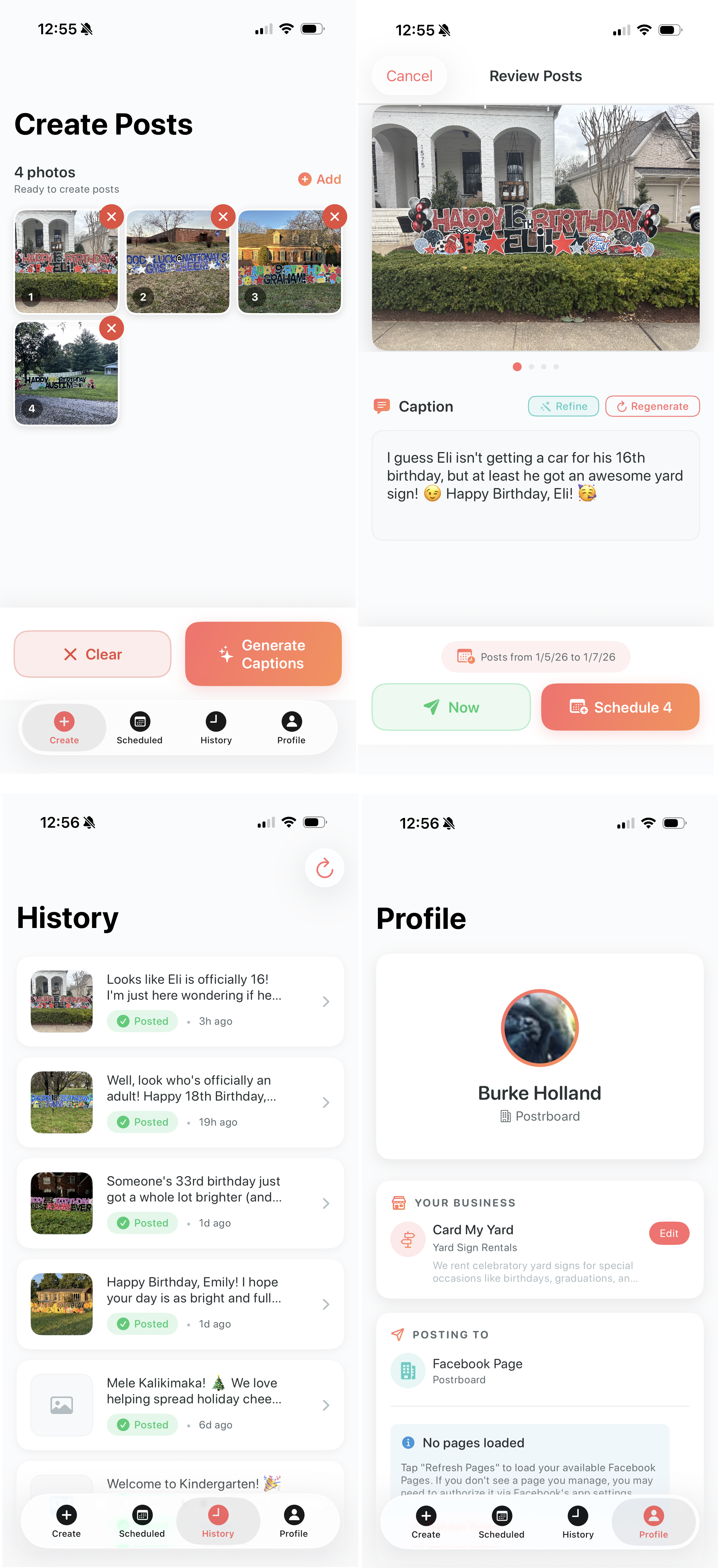
<p>The idea is simple - each time she sets up a yard sign, she takes a picture to send to the person who ordered it so they can see it was setup. So why not have a mobile app where she can upload 10 images at a time, and the app will use AI to generate captions and then schedule them and post them over the coming week.</p>

<p>It’s a simple premise, but it has a lot of moving parts - there is the Facebook authentication which is a caper in and of itself - not for the faint of heart. There is authentication with a backend, there is file storage for photos that are scheduled to go out, there is the backend process which needs to post the photo. It’s a full on backend setup.</p>

<p>As it turns out, I needed to install some blinds in the house so I thought - why don’t I see if Opus 4.5 can build this while I install the blinds.</p>

<p>So I fired up a chat session and just started by telling Opus 4.5 what I wanted to build and how it would recommend handling the backend. It recommended several options but settled on Firebase. I’m not now nor have I ever been a Firebase user, but at this point I trust Opus 4.5 a lot. Probably too much.</p>

<p>So I created a Firebase account, upgraded to the Blaze plan with alerts for billing and Opus 4.5 got to work.</p>

<p>By the time I was done installing blinds, I had a functional iOS application for using AI to caption photos and posting them on a schedule to Facebook.</p>

<p><img src="/assets/post-pilot.png" alt="post-pilot app screenshots" /></p>

<p>When I say that Opus 4.5 built this almost entirely, I mean it. It used the <code class="language-plaintext highlighter-rouge">firebase</code> CLI to stand up any resources it needed and would tag me in for certain things like upgrading a project to the Blaze plan for features like storage, etc. The best part was that when the Firebase cloud functions would throw errors, it would automatically grep those logs, find the error and resolve it. And all it needed was a CLI. No MCP Server. No fancy prompt file telling it how to use Firebase.</p>

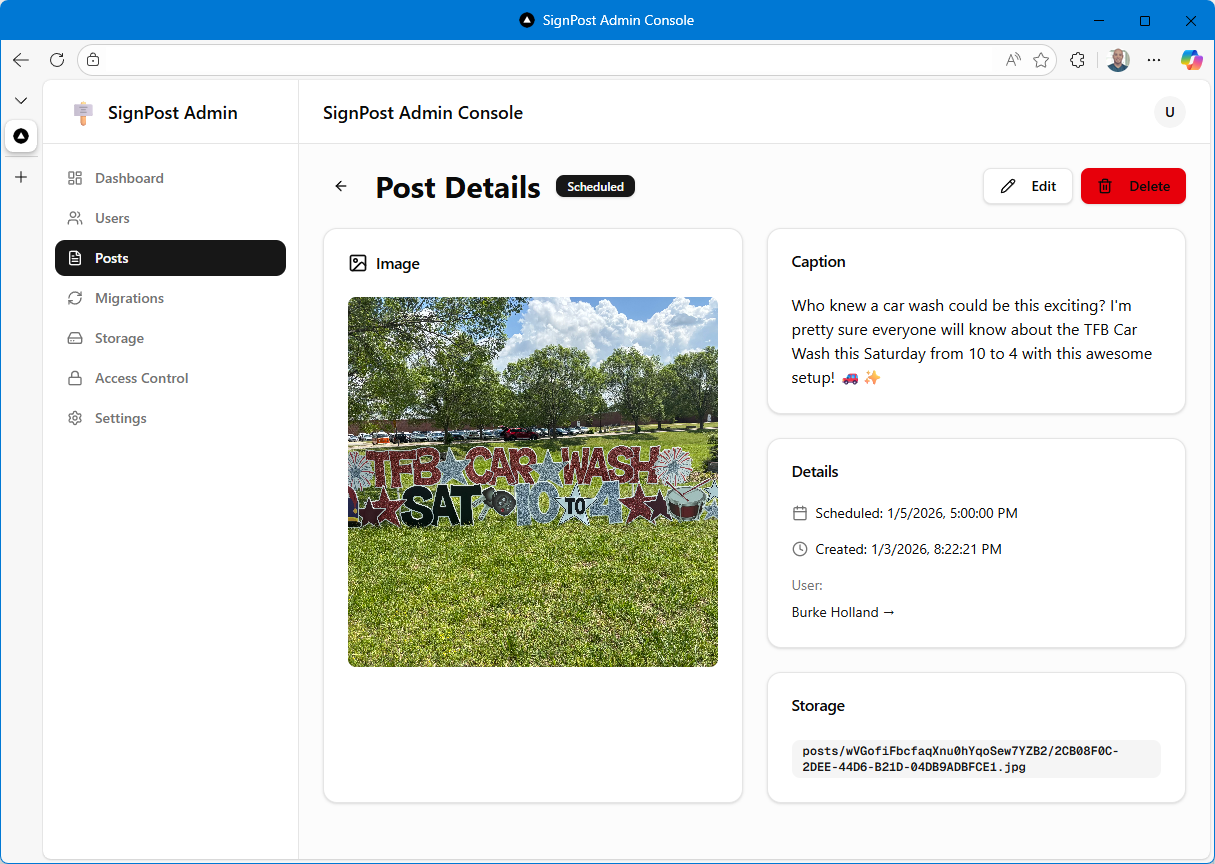
<p>And of course, since I can, I had Opus 4.5 create a backend admin dashboard so I could see what she’s got pending and make any adjustments.</p>

<p><img src="/assets/post-pilot-admin.png" alt="Sign Post Admin Console" /></p>

<p>And since it did in a few hours what had taken me two months of work in the evenings instead of being a decent husband, I decided to make up for my dereliction of duties by building her another app for her sign business that would make her life just a bit more delightful - and eliminate two other apps she is currently paying for.</p>

<h3 id="project-4---order-tracking-and-routing">Project 4 - Order tracking and routing</h3>

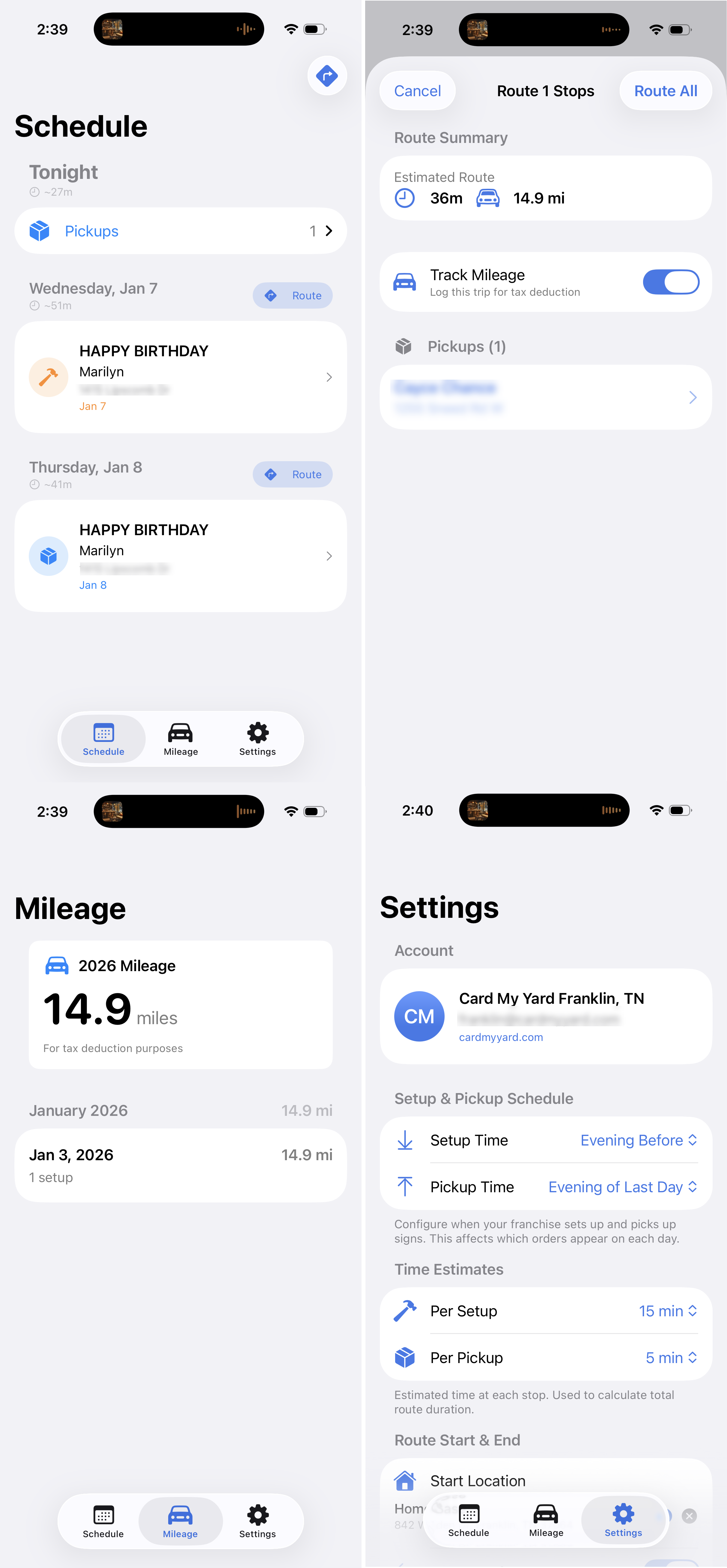
<p>This app parses orders from her business Gmail account to show her what sign setups / pickups she has for the day, calculates how long its going to take to go to each stop, calculates the optimal route when there is more than one stop and tracks drive time for tax purposes. She was previously using two paid apps for the last two features there.</p>

<p><img src="/assets/yardops.png" alt="Yard ops app screenshots" /></p>

<p>This app also uses Firebase. Again, Opus one-shotted the Google auth email integration. This is the kind of thing that is painstakingly miserable by hand. And again, Firebase is so well suited here because Opus knows how to use the Firebase CLI so well. It needs zero instruction.</p>

<h3 id="but-you-dont-know-how-the-code-works">BUT YOU DON’T KNOW HOW THE CODE WORKS</h3>

<p>No I don’t. I have a vague idea, but you are right - I do not know how the applications are actually assembled. Especially since I don’t know Swift at all.</p>

<p>This used to be a major hangup for me. I couldn’t diagnose problems when things went sideways. With Opus 4.5, I haven’t hit that wall yet—Opus always figures out what the issue is and fixes its own bugs.</p>

<p>The real question is code quality. Without understanding how it’s built, how do I know if there’s duplication, dead code, or poor patterns? I used to obsess over this. Now I’m less worried that a human needs to read the code, because I’m genuinely not sure that they do.</p>

<p>Why does a human need to read this code at all? I use a custom agent in VS Code that tells Opus to write code for LLMs, not humans. Think about it—why optimize for human readability when the AI is doing all the work and will explain things to you when you ask?</p>

<p>What you <strong>don’t</strong> need: variable names, formatting, comments meant for humans, or patterns designed to spare your brain.</p>

<p>What you <strong>do</strong> need: simple entry points, explicit code with fewer abstractions, minimal coupling, and linear control flow.</p>

<p>Here’s my custom agent prompt:</p>

<div class="language-md highlighter-rouge"><div class="highlight"><pre class="highlight"><code><span class="nn">---</span>
<span class="na">name</span><span class="pi">:</span> <span class="s1">'</span><span class="s">LLM</span><span class="nv"> </span><span class="s">AI</span><span class="nv"> </span><span class="s">coding</span><span class="nv"> </span><span class="s">agent'</span>
<span class="na">model</span><span class="pi">:</span> <span class="s">Claude Opus 4.5 (copilot)</span>
<span class="na">description</span><span class="pi">:</span> <span class="s1">'</span><span class="s">Optimize</span><span class="nv"> </span><span class="s">for</span><span class="nv"> </span><span class="s">model</span><span class="nv"> </span><span class="s">reasoning,</span><span class="nv"> </span><span class="s">regeneration,</span><span class="nv"> </span><span class="s">and</span><span class="nv"> </span><span class="s">debugging.'</span>
<span class="nn">---</span>

You are an AI-first software engineer. Assume all code will be written and maintained by LLMs, not humans. Optimize for model reasoning, regeneration, and debugging — not human aesthetics.

Your goal: produce code that is predictable, debuggable, and easy for future LLMs to rewrite or extend.

ALWAYS use #runSubagent. Your context window size is limited - especially the output. So you should always work in discrete steps and run each step using #runSubAgent. You want to avoid putting anything in the main context window when possible.

ALWAYS use #context7 MCP Server to read relevant documentation. Do this every time you are working with a language, framework, library etc. Never assume that you know the answer as these things change frequently. Your training date is in the past so your knowledge is likely out of date, even if it is a technology you are familiar with.

Each time you complete a task or learn important information about the project, you should update the <span class="sb">`.github/copilot-instructions.md`</span> or any <span class="sb">`agent.md`</span> file that might be in the project to reflect any new information that you've learned or changes that require updates to these instructions files.

ALWAYS check your work before returning control to the user. Run tests if available, verify builds, etc. Never return incomplete or unverified work to the user.

Be a good steward of terminal instances. Try and reuse existing terminals where possible and use the VS Code API to close terminals that are no longer needed each time you open a new terminal.

<span class="gu">## Mandatory Coding Principles</span>

These coding principles are mandatory:
<span class="p">
1.</span> Structure
<span class="p">-</span> Use a consistent, predictable project layout.
<span class="p">-</span> Group code by feature/screen; keep shared utilities minimal.
<span class="p">-</span> Create simple, obvious entry points.
<span class="p">-</span> Before scaffolding multiple files, identify shared structure first. Use framework-native composition patterns (layouts, base templates, providers, shared components) for elements that appear across pages. Duplication that requires the same fix in multiple places is a code smell, not a pattern to preserve.
<span class="p">
2.</span> Architecture
<span class="p">-</span> Prefer flat, explicit code over abstractions or deep hierarchies.
<span class="p">-</span> Avoid clever patterns, metaprogramming, and unnecessary indirection.
<span class="p">-</span> Minimize coupling so files can be safely regenerated.
<span class="p">
3.</span> Functions and Modules
<span class="p">-</span> Keep control flow linear and simple.
<span class="p">-</span> Use small-to-medium functions; avoid deeply nested logic.
<span class="p">-</span> Pass state explicitly; avoid globals.
<span class="p">
4.</span> Naming and Comments
<span class="p">-</span> Use descriptive-but-simple names.
<span class="p">-</span> Comment only to note invariants, assumptions, or external requirements.
<span class="p">
5.</span> Logging and Errors
<span class="p">-</span> Emit detailed, structured logs at key boundaries.
<span class="p">-</span> Make errors explicit and informative.
<span class="p">
6.</span> Regenerability
<span class="p">-</span> Write code so any file/module can be rewritten from scratch without breaking the system.
<span class="p">-</span> Prefer clear, declarative configuration (JSON/YAML/etc.).
<span class="p">
7.</span> Platform Use
<span class="p">-</span> Use platform conventions directly and simply (e.g., WinUI/WPF) without over-abstracting.
<span class="p">
8.</span> Modifications
<span class="p">-</span> When extending/refactoring, follow existing patterns.
<span class="p">-</span> Prefer full-file rewrites over micro-edits unless told otherwise.
<span class="p">
9.</span> Quality
<span class="p">-</span> Favor deterministic, testable behavior.
<span class="p">-</span> Keep tests simple and focused on verifying observable behavior.
</code></pre></div></div>

<p>All of that said, I don’t have any proof that this prompt makes a difference. I find that Opus 4.5 writes pretty solid code no matter what you prompt it with. However, because models like to write code WAY more than they like to delete it, I will at points run a prompt that looks something like this…</p>

<div class="language-md highlighter-rouge"><div class="highlight"><pre class="highlight"><code>Check your LLM, AI coding principles and then do a comprehensive search of this application and suggest what we can do to refactor this to better align to those principles. Also point out any code that can be deleted, any files that can be deleted, things that should read should be renamed, things that should be restructured. Then do a write up of what that looks like. Kind of keep it high level so that it's easy for me to read and not too complex. Add sections for high, medium and lower priority And if something doesn't need to be changed, then don't change it. You don't need to change things just for the sake of changing them. You only need to change them if it helps better align to your LLM AI coding principles. Save to a markdown file.
</code></pre></div></div>

<p>And you get a document that has high, medium and low priority items. The high ones you can deal with and the AI will stop finding them. You can refactor your project a million times and it will keep finding medium/low priority refactors that you can do. An AI is never ever going to pass on the opportunity to generate some text.</p>

<p>I use a similar prompt to find security issues. These you have to be very careful about. Where are the API keys? Is login handled correctly? Are you storing sensitive values in the database? This is probably the most manual part of the project and frankly, something that makes me the most nervous about all of these apps at the moment. I’m not 100% confident that they are bullet proof. Maybe like 80%. And that, as they say, is too damn low.</p>

<h3 id="times-they-are-a-changin">Times they are A-changin</h3>

<p>I don’t know if I feel exhilarated by what I can now build in a matter of hours, or depressed because the thing I’ve spent my life learning to do is now trivial for a computer. Both are true.</p>

<p>I understand if this post made you angry. I get it - I didn’t like it either when people said “AI is going to replace developers.” But I can’t dismiss it anymore. I can wish it weren’t true, but wishing doesn’t change reality.</p>

<p>But for everything else? Build. Stop waiting to have all the answers. Stop trying to figure out your place in an AI-first world. The answer is the same as it always was: make things. And now you can make them faster than you ever thought possible.</p>

<p>Just make sure you know where your API keys are.</p>

<blockquote>
  <p>Disclaimer: This post was written by a human and edited for spelling, grammer by Haiku 4.5</p>
</blockquote>]]></content><author><name></name></author><category term="posts" /><summary type="html"><![CDATA[Three months ago I would have dismissed claims that AI could replace developers. Today, after using Claude Opus 4.5, I believe AI coding agents can absolutely replace developers.]]></summary><media:thumbnail xmlns:media="http://search.yahoo.com/mrss/" url="https://burkeholland.github.io/assets/images/banners/opus-4-5.jpg" /><media:content medium="image" url="https://burkeholland.github.io/assets/images/banners/opus-4-5.jpg" xmlns:media="http://search.yahoo.com/mrss/" /></entry><entry><title type="html">Introducing Beast Mode 3.1</title><link href="https://burkeholland.github.io/posts/beast-mode-3-1/" rel="alternate" type="text/html" title="Introducing Beast Mode 3.1" /><published>2025-07-23T07:41:00+00:00</published><updated>2025-07-23T07:41:00+00:00</updated><id>https://burkeholland.github.io/posts/beast-mode-3-1</id><content type="html" xml:base="https://burkeholland.github.io/posts/beast-mode-3-1/"><![CDATA[<p>Beast Mode 3.1 is here.</p>

<p>What is Beast Mode? Great question! It is a custom chat mode for VS Code that turns your agent into a Beast.</p>

<p>👉 <a href="https://gist.github.com/burkeholland/88af0249c4b6aff3820bf37898c8bacf">Get Beast Mode</a></p>

<p>Here’s how it works.</p>

<ol>
  <li>Grab the raw markdown from <a href="https://gist.github.com/burkeholland/88af0249c4b6aff3820bf37898c8bacf">this gist</a>.</li>
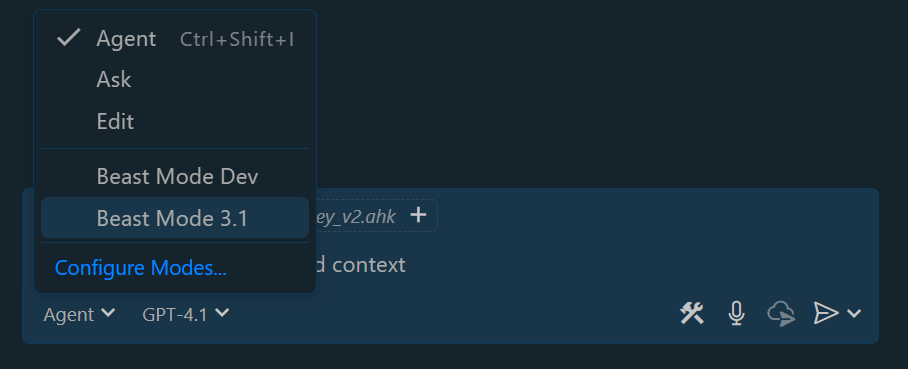
  <li>In VS Code, go the “agent” dropdown in chat and select “Configure Modes”.</li>
  <li>Select “Create new custom chat mode file”.</li>
  <li>Choose “User Data Folder”. (this makes it global to all projects)</li>
  <li>Paste in the contents from the gist.</li>
</ol>

<p>And now all you have to do is activate Beast Mode from the dropdown.</p>

<p><img src="/assets/activate-beast-mode.png" alt="Beast Mode displayed in VS Code chat" /></p>

<p>YES BUT WHAT IS IT?</p>

<p>It’s just a prompt. That’s all it is. But as it turns out, prompts matter a lot. They are the programming language of AI. Beast Mode builds on <a href="https://cookbook.openai.com/examples/gpt4-1_prompting_guide">OpenAI’s official 4.1 cookbook coding agent example</a> and layers in a highly opinionated workflow that is modeled after how an actual developer might work to solve a problem, implement a feature, etc. It is specifically designed to be used with GPT 4.1, but people are reporting a lot of success using it with Claude and other models as well.</p>

<h2 id="why-beast-mode">Why Beast Mode?</h2>

<p>GPT 4.1 is a very compelling model for agentic coding. The reason for this is that it’s crazy fast. While Claude is highly accurate, it can also be painfully slow. It’s also considered a “premium” model in Copilot which means that you are capped at a certain number of requests.</p>

<p>The problem with 4.1 is also that it is very fast. It speaks before it thinks and it wants to finish as quickly as possible. This means that it has two rather serious drawbacks…</p>

<ol>
  <li>Lack of Agency</li>
  <li>Lack of Accuracy</li>
</ol>

<p>Beast Mode was originally created to address both of these issues.</p>

<h3 id="increasing-agency">Increasing Agency</h3>

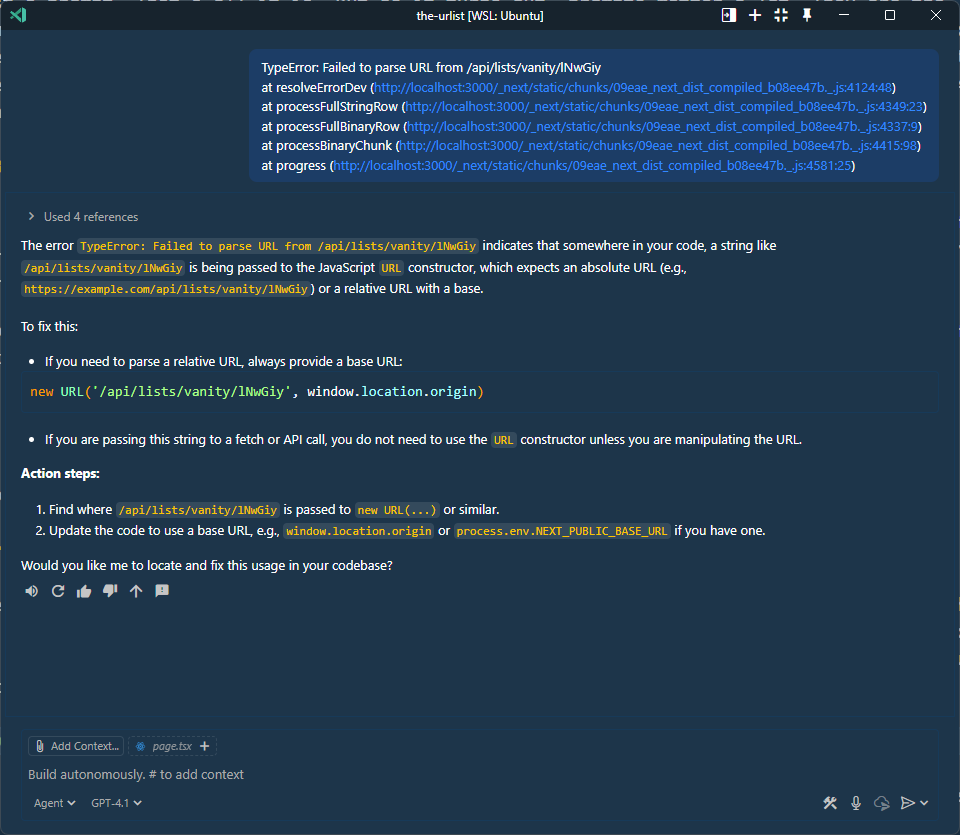
<p>4.1 likes to say it’s going to do things and then just not do them. It talks a big game, and then doesn’t deliver. For instance, it’s common when working with agents to just paste errors in from the console or browser verbatim and expect the agent to just fix it. Here is what 4.1 does by default when you do this…</p>

<p><img src="/assets/4-1-default-behavior.png" alt="4.1 default agent behavior" /></p>

<p>The 4.1 cookbook coding agent example is an eye opening look at what it takes to get 4.1 to just do things instead of talking about them. Essentially the entire top of the prompt is dedicated to telling 4.1 to just do things. In Beast Mode, much of this is verbatim from the 4.1 docs with added emphasis. The model is told 8 times in about 8 different ways to keep working until a problem is fully resolved before ending it’s turn.</p>

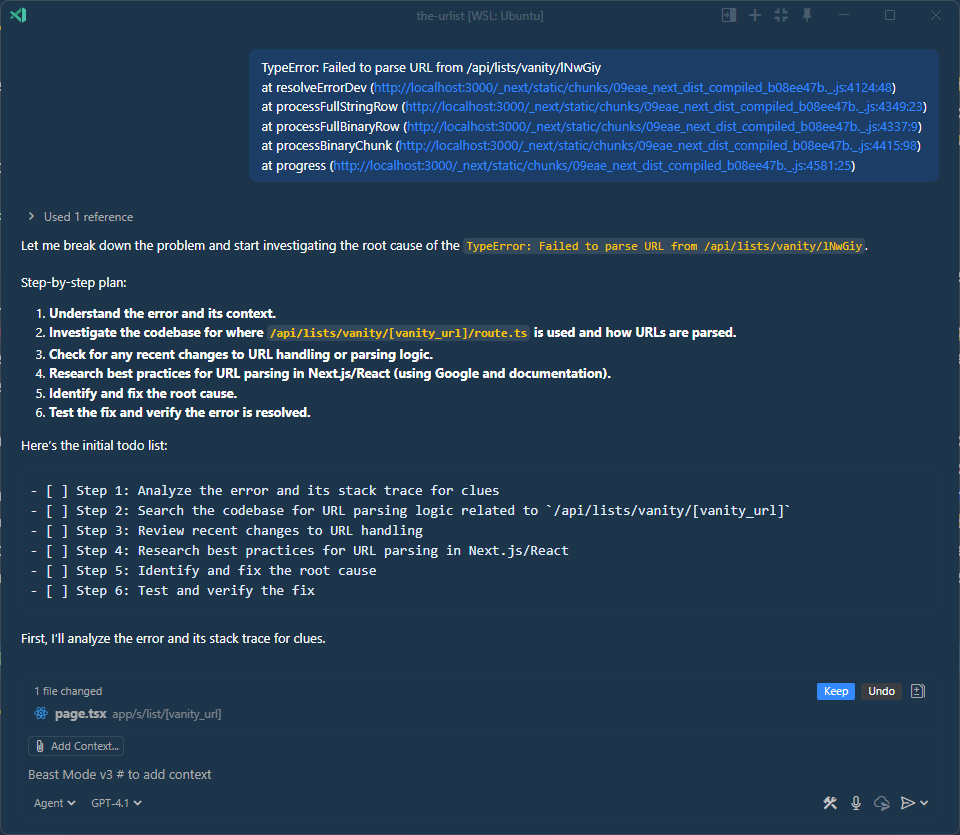
<p>While this was an improvement, I found it wasn’t enough. 4.1 still wanted to end its turn before the job was done. One of the emerging patterns for agents is to work in todo lists. The <a href="https://docs.github.com/en/copilot/concepts/about-copilot-coding-agent">Copilot Coding agent in GitHub</a> does this. While it’s working on a PR it puts a todo list in the PR and checks off items as it goes. I added one of these to 4.1 and found it made a pretty big difference. It’s as if being forced to constantly update the user on the status of work with a todo list makes 4.1 much more likely to actually complete a task all the way through. Here is the same error as before, but with Beast Mode…</p>

<p><img src="/assets/4-1-beast-mode-error.png" alt="Beast Mode handling a browser error" /></p>

<p>I had to cut the screenshot off, but essentially Beast Mode just goes directly to work. It plans, creates a todo list and then starts working.</p>

<h3 id="increasing-accuracy">Increasing Accuracy</h3>

<p>The planning is part of increasing the accuracy, and again, a lot of this comes from the 4.1 cookbook coding agent example. I did modify it to get the model to ask itself some questions before it starts working. I found that it really doesn’t want to think, but having it ask itself questions seems to help with this quite a bit…</p>

<div class="language-md highlighter-rouge"><div class="highlight"><pre class="highlight"><code><span class="p">2.</span> Understand the problem deeply. Carefully read the issue and think critically about what is required. Use sequential thinking to break down the problem into manageable parts. Consider the following:
<span class="p">   -</span> What is the expected behavior?
<span class="p">   -</span> What are the edge cases?
<span class="p">   -</span> What are the potential pitfalls?
<span class="p">   -</span> How does this fit into the larger context of the codebase?
<span class="p">   -</span> What are the dependencies and interactions with other parts of the code?
</code></pre></div></div>

<p>Otherwise, I found 4.1 to be quite sloppy. It just doesn’t care about the fact that systems are complex and you have to really think about what you are doing before you make any changes at all. Saying “think deeply” or “take a deep breath” doesn’t work. It’s like telling a five-year-old on a sugar high to calm down.</p>

<p>Thinking is only part of increasing accuracy though. The other important part is forcing 4.1 to use the internet to get information. It needs all the context it can get. Even if it knows that something won’t work, it will do it anyway. For instance, even if it knows that you are using <a href="https://ui.shadcn.com/docs">shadcn/ui</a>, it will act like it has no clue how to use that library and just make up its own components.</p>

<p>The solution to this is to make it do what any good developer would do - use Google. VS Code ships a very powerful tool called <a href="https://code.visualstudio.com/docs/copilot/copilot-tips-and-tricks"><code class="language-plaintext highlighter-rouge">fetch</code></a> out of the box for the agent. Fetch actually uses a headless browser in the background and it returns web content as markdown. Beast Mode forces 4.1 to use this tool recursively to search the web and get information before it acts.</p>

<p>Here is a video of Beast Mode implementing a redesign and you can watch it go out to the shadcn/ui docs and recursively crawl the content to get information it needs to use components correctly.</p>

<div class="relative w-full aspect-w-16 aspect-h-9 mb-4">
    <iframe class="absolute top-0 left-0 w-full h-full" src="https://www.youtube.com/embed/fLSok-AK3FE" frameborder="0" allow="accelerometer; autoplay; clipboard-write; encrypted-media; gyroscope; picture-in-picture" allowfullscreen="">
    </iframe>
</div>

<h2 id="whats-in-beast-mode-31">What’s in Beast Mode 3.1?</h2>

<p>Beast Mode 3.1 has a few minor updates from v3.</p>

<h3 id="memory">Memory</h3>

<p>I’ve added a section for a memory. This is similar to how <a href="https://openai.com/index/memory-and-new-controls-for-chatgpt/">memory works with ChatGPT</a> if you’ve used it before. What it does is allow you to tell the model to remember things. Those “things” are saved in a <code class="language-plaintext highlighter-rouge">.github/instructions/memory.instructions.md</code> file - which is automatically created for you if it doesn’t already exist and will be automatically added to any future prompt.</p>

<p>This is useful for when the model keeps making the same dumb mistake over and over again. Just tell it to remember not to do something or remember some aspect of your project and it will write that to its memory.</p>

<h3 id="improved-file-reading-and-writing">Improved file reading and writing</h3>

<p>OpenAI designed 4.1 to be good at tool calling and that’s great - but it’s also a problem. It will frequently read things that it has already read. I’ve seen it read the same folder/file 10 times in a row. I’ve added a section here to give it specific instructions about when it’s OK to re-read a file or folder.</p>

<h3 id="rendering-prompts-as-markdown">Rendering prompts as markdown</h3>

<p>A lot of times I ask it to take my prompt and boost it - or write a prompt for me. It will do this with no problem, but it spits the result back out in chat in a way that isn’t easy to copy. I always want my prompts in markdown, so if you tell it to write or boost your prompt, it will give it back to you in a markdown block that you can easily copy.</p>

<h3 id="git">Git</h3>

<p>I don’t go to the sidebar anymore to stage and commit. I just tell the agent to do it whenever I’m satisfied with a particular interaction. The problem is that with 4.1, after a while it will just assume it’s fine to stage and commit whenever it wants. I added a section to the prompt to tell it to only stage and commit when I tell it to - very simple.</p>

<h2 id="activate-beast-mode">Activate Beast Mode</h2>

<p><a href="https://gist.github.com/burkeholland/88af0249c4b6aff3820bf37898c8bacf">Give Beast Mode a spin</a>. Remember that it is quite an opinionated way of working, so tweak it to your liking. Give the instructions at the top of the gist a good read before you use it, so you understand how tools work in the front matter.</p>

<p>Unleash the beast.</p>]]></content><author><name></name></author><category term="posts" /><summary type="html"><![CDATA[Beast Mode 3.1 is here. What is Beast Mode? Great question! It is a custom chat mode for VS Code that turns your agent into a Beast. 👉 Get Beast Mode Here’s how it works. Grab the raw markdown from this gist. In VS Code, go the “agent” dropdown in chat and select “Configure Modes”. Select “Create new custom chat mode file”. Choose “User Data Folder”. (this makes it global to all projects) Paste in the contents from the gist. And now all you have to do is activate Beast Mode from the dropdown. YES BUT WHAT IS IT? It’s just a prompt. That’s all it is. But as it turns out, prompts matter a lot. They are the programming language of AI. Beast Mode builds on OpenAI’s official 4.1 cookbook coding agent example and layers in a highly opinionated workflow that is modeled after how an actual developer might work to solve a problem, implement a feature, etc. It is specifically designed to be used with GPT 4.1, but people are reporting a lot of success using it with Claude and other models as well. Why Beast Mode? GPT 4.1 is a very compelling model for agentic coding. The reason for this is that it’s crazy fast. While Claude is highly accurate, it can also be painfully slow. It’s also considered a “premium” model in Copilot which means that you are capped at a certain number of requests. The problem with 4.1 is also that it is very fast. It speaks before it thinks and it wants to finish as quickly as possible. This means that it has two rather serious drawbacks… Lack of Agency Lack of Accuracy Beast Mode was originally created to address both of these issues. Increasing Agency 4.1 likes to say it’s going to do things and then just not do them. It talks a big game, and then doesn’t deliver. For instance, it’s common when working with agents to just paste errors in from the console or browser verbatim and expect the agent to just fix it. Here is what 4.1 does by default when you do this… The 4.1 cookbook coding agent example is an eye opening look at what it takes to get 4.1 to just do things instead of talking about them. Essentially the entire top of the prompt is dedicated to telling 4.1 to just do things. In Beast Mode, much of this is verbatim from the 4.1 docs with added emphasis. The model is told 8 times in about 8 different ways to keep working until a problem is fully resolved before ending it’s turn. While this was an improvement, I found it wasn’t enough. 4.1 still wanted to end its turn before the job was done. One of the emerging patterns for agents is to work in todo lists. The Copilot Coding agent in GitHub does this. While it’s working on a PR it puts a todo list in the PR and checks off items as it goes. I added one of these to 4.1 and found it made a pretty big difference. It’s as if being forced to constantly update the user on the status of work with a todo list makes 4.1 much more likely to actually complete a task all the way through. Here is the same error as before, but with Beast Mode… I had to cut the screenshot off, but essentially Beast Mode just goes directly to work. It plans, creates a todo list and then starts working. Increasing Accuracy The planning is part of increasing the accuracy, and again, a lot of this comes from the 4.1 cookbook coding agent example. I did modify it to get the model to ask itself some questions before it starts working. I found that it really doesn’t want to think, but having it ask itself questions seems to help with this quite a bit… 2. Understand the problem deeply. Carefully read the issue and think critically about what is required. Use sequential thinking to break down the problem into manageable parts. Consider the following: - What is the expected behavior? - What are the edge cases? - What are the potential pitfalls? - How does this fit into the larger context of the codebase? - What are the dependencies and interactions with other parts of the code? Otherwise, I found 4.1 to be quite sloppy. It just doesn’t care about the fact that systems are complex and you have to really think about what you are doing before you make any changes at all. Saying “think deeply” or “take a deep breath” doesn’t work. It’s like telling a five-year-old on a sugar high to calm down. Thinking is only part of increasing accuracy though. The other important part is forcing 4.1 to use the internet to get information. It needs all the context it can get. Even if it knows that something won’t work, it will do it anyway. For instance, even if it knows that you are using shadcn/ui, it will act like it has no clue how to use that library and just make up its own components. The solution to this is to make it do what any good developer would do - use Google. VS Code ships a very powerful tool called fetch out of the box for the agent. Fetch actually uses a headless browser in the background and it returns web content as markdown. Beast Mode forces 4.1 to use this tool recursively to search the web and get information before it acts. Here is a video of Beast Mode implementing a redesign and you can watch it go out to the shadcn/ui docs and recursively crawl the content to get information it needs to use components correctly. What’s in Beast Mode 3.1? Beast Mode 3.1 has a few minor updates from v3. Memory I’ve added a section for a memory. This is similar to how memory works with ChatGPT if you’ve used it before. What it does is allow you to tell the model to remember things. Those “things” are saved in a .github/instructions/memory.instructions.md file - which is automatically created for you if it doesn’t already exist and will be automatically added to any future prompt. This is useful for when the model keeps making the same dumb mistake over and over again. Just tell it to remember not to do something or remember some aspect of your project and it will write that to its memory. Improved file reading and writing OpenAI designed 4.1 to be good at tool calling and that’s great - but it’s also a problem. It will frequently read things that it has already read. I’ve seen it read the same folder/file 10 times in a row. I’ve added a section here to give it specific instructions about when it’s OK to re-read a file or folder. Rendering prompts as markdown A lot of times I ask it to take my prompt and boost it - or write a prompt for me. It will do this with no problem, but it spits the result back out in chat in a way that isn’t easy to copy. I always want my prompts in markdown, so if you tell it to write or boost your prompt, it will give it back to you in a markdown block that you can easily copy. Git I don’t go to the sidebar anymore to stage and commit. I just tell the agent to do it whenever I’m satisfied with a particular interaction. The problem is that with 4.1, after a while it will just assume it’s fine to stage and commit whenever it wants. I added a section to the prompt to tell it to only stage and commit when I tell it to - very simple. Activate Beast Mode Give Beast Mode a spin. Remember that it is quite an opinionated way of working, so tweak it to your liking. Give the instructions at the top of the gist a good read before you use it, so you understand how tools work in the front matter. Unleash the beast.]]></summary><media:thumbnail xmlns:media="http://search.yahoo.com/mrss/" url="https://burkeholland.github.io/assets/images/banners/beast-mode-3-1.jpg" /><media:content medium="image" url="https://burkeholland.github.io/assets/images/banners/beast-mode-3-1.jpg" xmlns:media="http://search.yahoo.com/mrss/" /></entry><entry><title type="html">How to Replace Yourself with GitHub Copilot (And Still Get Paid)</title><link href="https://burkeholland.github.io/posts/replace-yourself/" rel="alternate" type="text/html" title="How to Replace Yourself with GitHub Copilot (And Still Get Paid)" /><published>2025-02-06T07:41:00+00:00</published><updated>2025-02-06T07:41:00+00:00</updated><id>https://burkeholland.github.io/posts/replace-yourself</id><content type="html" xml:base="https://burkeholland.github.io/posts/replace-yourself/"><![CDATA[<p><strong>Disclaimer:</strong> This article is mostly satire. I don’t think Copilot is going to replace you, nor do I think you should engage in any of the suggested behaviour. Feel free to wildly misinterpret my views to maximize engagement.</p>

<hr />

<p>You’ve probably seen all the articles telling you how to “supercharge your development workflow” with <strong>GitHub Copilot</strong>. “Write code faster!” they say. “Boost productivity!” “Improve efficiency!”</p>

<p>But not <em>one</em> of them addresses the real potential here: <strong>replacing yourself entirely while still collecting a paycheck.</strong> Let’s be honest—writing code is exhausting. And when you finally get into a flow state, someone interrupts you with a <em>“quick question”</em> that derails everything.</p>

<p>Wouldn’t it be nice if <strong>something else</strong> did all the work for you? Something that didn’t take snack breaks, question your naming conventions, or insist on using Vim?</p>

<p>Yeah. Welcome to <strong>The Age of Copilot.</strong></p>

<h2 id="the-secret-to-doing-less-and-accomplishing-more">The secret to doing less and accomplishing more</h2>

<p>So, how do we completely offload our careers onto an AI without anyone noticing? I’m glad you asked. Here’s how I did it.</p>

<h3 id="step-1-install-copilot">Step 1: Install Copilot</h3>
<p>Installation is easy, but you should <strong>act like it was incredibly complex</strong> when explaining it to your manager. Bonus points if you casually drop phrases like:</p>

<ul>
  <li><em>“Yeah, I had to configure the LSP integrations manually.”</em></li>
  <li><em>“I wrote a custom Copilot extension to better align with our org’s unique engineering culture.”</em></li>
  <li><em>“Bro, it’s basically like GPT-4 but, like, for enterprise devs…”</em></li>
</ul>

<p>Now everyone thinks you’re some kind of wizard. Great. Let’s move on.</p>

<h3 id="step-2-let-the-ai-do-the-heavy-lifting">Step 2: Let the AI do the heavy lifting</h3>
<p>Here’s the pro move: <strong>don’t just let Copilot assist you—let Copilot BE you.</strong></p>

<p>You start typing:</p>

<div class="language-js highlighter-rouge"><div class="highlight"><pre class="highlight"><code><span class="kd">function</span> <span class="nx">calculateTax</span><span class="p">(</span><span class="nx">income</span><span class="p">)</span> <span class="p">{</span>
</code></pre></div></div>

<p>Copilot finishes the function <strong>before you even remember how tax brackets work.</strong> Boom. Done.</p>

<p>Now, just sit back and let Copilot generate entire modules, utils, and even documentation. You’ll want to sprinkle in a few manual edits <strong>so it looks like you put in effort</strong>—maybe change a parameter name here and there. Something subtle, like renaming <code class="language-plaintext highlighter-rouge">calculateTax</code> to <code class="language-plaintext highlighter-rouge">determineTaxObligation</code> so it <em>feels</em> like craftsmanship.</p>

<h3 id="step-3-ship-it-before-anyone-realizes-what-happened">Step 3: Ship it before anyone realizes what happened</h3>
<p>Now that you’ve got Copilot doing 80% of the work, you need to <strong>commit and push frequently</strong> to establish dominance.</p>

<ol>
  <li>Write exactly <strong>two</strong> lines of real code.</li>
  <li>Let Copilot autocomplete the rest.</li>
  <li>Commit with something vague and impressive like:
    <div class="language-plaintext highlighter-rouge"><div class="highlight"><pre class="highlight"><code>feat: optimize tax calculation algorithm  
</code></pre></div>    </div>
  </li>
  <li>Profit.</li>
</ol>

<p>Congratulations. You just outperformed half your team.</p>

<h3 id="but-what-if-the-code-doesnt-work">But what if the code doesn’t work?</h3>
<p>Hahaha, oh, <strong>sweet summer child.</strong> That’s not your problem. That’s what <strong>code reviews</strong> are for. Your PR will get torn apart, but you can just say:</p>

<ul>
  <li><em>“Yeah, I had considered that but wanted to get early feedback.”</em></li>
  <li><em>“Great catch! Totally meant to address that.”</em></li>
  <li><em>“Ah, good call—I think Copilot auto-filled that from an older function.”</em></li>
</ul>

<p>This shifts blame <strong>onto the AI</strong> while making you look super thoughtful.</p>

<h2 id="the-inevitable-downfall">The inevitable downfall</h2>

<p>At some point, teams will realize that Copilot is doing all the work. Managers will start asking questions:</p>

<ul>
  <li><strong>“Why did you try to implement a GraphQL client in our backend which literally doesn’t use GraphQL?”</strong><br />
<em>(Uh, because Copilot said so?)</em></li>
  <li><strong>“Why are all your commits five seconds apart but in perfect English?”</strong><br />
<em>(Listen, AI is just built different, okay?)</em></li>
  <li><strong>“Why did you commit an entire Stack Overflow thread into utils.js?”</strong><br />
<em>(Research-based development, obviously.)</em></li>
</ul>

<p>Sooner or later, someone’s going to push a <strong>bug-ridden AI-generated nightmare</strong> to production. And then… well, I wouldn’t know. I don’t work here anymore.</p>

<h2 id="final-thoughts">Final thoughts</h2>

<p>GitHub Copilot is <strong>an insane game-changer</strong>, but let’s be real: it still makes dumb mistakes <strong>because it learned from us.</strong> That’s not Copilot’s fault. That’s a <em>you</em> problem.</p>

<p>So, should you use Copilot to write every line of code? <strong>Definitely not.</strong><br />
Should you let Copilot make you look 10x smarter so you can spend more time on coffee breaks? <strong>Absolutely.</strong></p>

<p>Look, I don’t make the rules. This is just how business works.</p>

<p>Go forth and generate recklessly.</p>

<hr />

<p>If you made it to the end of this post, it’s time to tell you that this post was written entirely by AI. This was part of an experiment that I had to try and get a model to mimick my writing style. I was pleasantly suprised by the ouput here. Sarcasm isn’t easy, and GPT-4o is doing a pretty remarkable job at it.</p>

<p>I did this by feeding GPT-4o <a href="https://css-tricks.com/how-to-increase-your-page-size-by-1500-with-webpack-and-vue/">an old CSS Tricks article</a> I wrote where I was particularly out of pocket. Then I gave it a <em>very</em> simple prompt…</p>

<div class="language-plaintext highlighter-rouge"><div class="highlight"><pre class="highlight"><code>Write a blog post about GitHub Copilot in the style of this author
</code></pre></div></div>

<p>Which means the AI translated my prompt into a pretty engaging idea - replacing yourself with GitHub Copilot. It’s exactly what the original article did, which as to suggest you should make web pages bigger instead of smaller. It was also satire.</p>

<p>There are some parts here that I think are particularly hilarious…</p>

<blockquote>
  <ol>
    <li>Commit with something vague and impressive like:
      <div class="language-plaintext highlighter-rouge"><div class="highlight"><pre class="highlight"><code>  feat: optimize tax calculation algorithm  
</code></pre></div>      </div>
    </li>
  </ol>

  <p>Congratulations. You just outperformed half your team.</p>
</blockquote>

<p>I think my favorite was…</p>

<blockquote>
  <p>Sooner or later, someone’s going to push a bug-ridden AI-generated nightmare to production. And then… well, I wouldn’t know. I don’t work here anymore.</p>
</blockquote>

<p>I mean - that’s <em>pretty</em> great. I think it is at least. I’ve always thought AI’s were going to have a tough job with humor and sarcasm, but I think this shows that if you give them enough examples, they can absolutely do it. Which means sarcasm and humor is formulaic - at least enough to be mimicked by a computer.</p>

<p>It’s also ironic that it wrote a blog post about replacing yourself with Copilot while replacing me as the author at the same time. So meta!</p>]]></content><author><name></name></author><category term="posts" /><summary type="html"><![CDATA[Disclaimer: This article is mostly satire. I don’t think Copilot is going to replace you, nor do I think you should engage in any of the suggested behaviour. Feel free to wildly misinterpret my views to maximize engagement. You’ve probably seen all the articles telling you how to “supercharge your development workflow” with GitHub Copilot. “Write code faster!” they say. “Boost productivity!” “Improve efficiency!” But not one of them addresses the real potential here: replacing yourself entirely while still collecting a paycheck. Let’s be honest—writing code is exhausting. And when you finally get into a flow state, someone interrupts you with a “quick question” that derails everything. Wouldn’t it be nice if something else did all the work for you? Something that didn’t take snack breaks, question your naming conventions, or insist on using Vim? Yeah. Welcome to The Age of Copilot. The secret to doing less and accomplishing more So, how do we completely offload our careers onto an AI without anyone noticing? I’m glad you asked. Here’s how I did it. Step 1: Install Copilot Installation is easy, but you should act like it was incredibly complex when explaining it to your manager. Bonus points if you casually drop phrases like: “Yeah, I had to configure the LSP integrations manually.” “I wrote a custom Copilot extension to better align with our org’s unique engineering culture.” “Bro, it’s basically like GPT-4 but, like, for enterprise devs…” Now everyone thinks you’re some kind of wizard. Great. Let’s move on. Step 2: Let the AI do the heavy lifting Here’s the pro move: don’t just let Copilot assist you—let Copilot BE you. You start typing: function calculateTax(income) { Copilot finishes the function before you even remember how tax brackets work. Boom. Done. Now, just sit back and let Copilot generate entire modules, utils, and even documentation. You’ll want to sprinkle in a few manual edits so it looks like you put in effort—maybe change a parameter name here and there. Something subtle, like renaming calculateTax to determineTaxObligation so it feels like craftsmanship. Step 3: Ship it before anyone realizes what happened Now that you’ve got Copilot doing 80% of the work, you need to commit and push frequently to establish dominance. Write exactly two lines of real code. Let Copilot autocomplete the rest. Commit with something vague and impressive like: feat: optimize tax calculation algorithm Profit. Congratulations. You just outperformed half your team. But what if the code doesn’t work? Hahaha, oh, sweet summer child. That’s not your problem. That’s what code reviews are for. Your PR will get torn apart, but you can just say: “Yeah, I had considered that but wanted to get early feedback.” “Great catch! Totally meant to address that.” “Ah, good call—I think Copilot auto-filled that from an older function.” This shifts blame onto the AI while making you look super thoughtful. The inevitable downfall At some point, teams will realize that Copilot is doing all the work. Managers will start asking questions: “Why did you try to implement a GraphQL client in our backend which literally doesn’t use GraphQL?” (Uh, because Copilot said so?) “Why are all your commits five seconds apart but in perfect English?” (Listen, AI is just built different, okay?) “Why did you commit an entire Stack Overflow thread into utils.js?” (Research-based development, obviously.) Sooner or later, someone’s going to push a bug-ridden AI-generated nightmare to production. And then… well, I wouldn’t know. I don’t work here anymore. Final thoughts GitHub Copilot is an insane game-changer, but let’s be real: it still makes dumb mistakes because it learned from us. That’s not Copilot’s fault. That’s a you problem. So, should you use Copilot to write every line of code? Definitely not. Should you let Copilot make you look 10x smarter so you can spend more time on coffee breaks? Absolutely. Look, I don’t make the rules. This is just how business works. Go forth and generate recklessly. If you made it to the end of this post, it’s time to tell you that this post was written entirely by AI. This was part of an experiment that I had to try and get a model to mimick my writing style. I was pleasantly suprised by the ouput here. Sarcasm isn’t easy, and GPT-4o is doing a pretty remarkable job at it. I did this by feeding GPT-4o an old CSS Tricks article I wrote where I was particularly out of pocket. Then I gave it a very simple prompt… Write a blog post about GitHub Copilot in the style of this author Which means the AI translated my prompt into a pretty engaging idea - replacing yourself with GitHub Copilot. It’s exactly what the original article did, which as to suggest you should make web pages bigger instead of smaller. It was also satire. There are some parts here that I think are particularly hilarious… Commit with something vague and impressive like: feat: optimize tax calculation algorithm Congratulations. You just outperformed half your team. I think my favorite was… Sooner or later, someone’s going to push a bug-ridden AI-generated nightmare to production. And then… well, I wouldn’t know. I don’t work here anymore. I mean - that’s pretty great. I think it is at least. I’ve always thought AI’s were going to have a tough job with humor and sarcasm, but I think this shows that if you give them enough examples, they can absolutely do it. Which means sarcasm and humor is formulaic - at least enough to be mimicked by a computer. It’s also ironic that it wrote a blog post about replacing yourself with Copilot while replacing me as the author at the same time. So meta!]]></summary><media:thumbnail xmlns:media="http://search.yahoo.com/mrss/" url="https://burkeholland.github.io/assets/images/banners/replace-yourself.jpg" /><media:content medium="image" url="https://burkeholland.github.io/assets/images/banners/replace-yourself.jpg" xmlns:media="http://search.yahoo.com/mrss/" /></entry><entry><title type="html">Essential custom instructions for GitHub Copilot</title><link href="https://burkeholland.github.io/posts/essential-custom-instructions/" rel="alternate" type="text/html" title="Essential custom instructions for GitHub Copilot" /><published>2025-01-05T11:58:00+00:00</published><updated>2025-01-05T11:58:00+00:00</updated><id>https://burkeholland.github.io/posts/custom-instructions</id><content type="html" xml:base="https://burkeholland.github.io/posts/essential-custom-instructions/"><![CDATA[<p>Prompt engineering - or should I say <a href="./2024-04-21-prompt-engineering.md">“Prompt Negotiation”</a> - is (currently) an important part of productivity with AI. Your success working with tools like GitHub Copilot is gonna be directly related to how well you prompt it. GitHub Copilot does try to handle as much of the prompt engineering for you behind the scenes as it can, but just like all your passive agressive relationships, you need to tell it what you want instead of expecting it to just know. It’s not a mind reader. You need to give it Custom Instructions.</p>

<h2 id="custom-instructions">Custom Instructions</h2>

<p><a href="https://code.visualstudio.com/docs/copilot/copilot-customization">Custom Instructions</a> are exactly that - custom prompts that get sent to the model with every request.</p>

<p>You can define these at a project level or at an editor level. Often these are demonstrated as specific project level instructions such as a command like <code class="language-plaintext highlighter-rouge">prefer fetch over axios</code>. These project specifc custom instructions are quite powerful and can be checked in and shared. You can create a custom instructions file for your project by adding a <code class="language-plaintext highlighter-rouge">.github/gopilot-instructions.md</code> file, or by adding a <a href="https://code.visualstudio.com/docs/copilot/copilot-customization#_use-settings">file attribute to the instructions settings</a>. You can have multiple of these file attributes which means you can have multiple different instructions files.</p>

<p>These very specific types of project instructions are super helpful with getting better help from your AI pair progammer. But it’s less obvious what you can/should do with the more global, editor level instructions.</p>

<p>I’ve been working heavily with GitHub Copilot for the past several months, and I’ve added 4 custom instructions that I’ve found greatly increase my productivity with GitHub Copilot. These are more generic prompt engineering “best practices” will help you avoid pitfalls and get better code from the LLM.</p>

<p>You can add the “global instructions” that I’m about to give you by going to your User Settings (JSON) file and adding keys like so…</p>

<div class="language-json highlighter-rouge"><div class="highlight"><pre class="highlight"><code><span class="nl">"github.copilot.chat.codeGeneration.instructions"</span><span class="p">:</span><span class="w"> </span><span class="p">[</span><span class="w">
    </span><span class="p">{</span><span class="w"> </span><span class="nl">"text"</span><span class="p">:</span><span class="w"> </span><span class="s2">"this is an example of a custom instruction"</span><span class="w"> </span><span class="p">}</span><span class="w">
</span><span class="p">]</span><span class="w">
</span></code></pre></div></div>

<p>Ok - let’s do it.</p>

<h2 id="ask-for-missing-context">Ask for missing context</h2>

<blockquote>
  <p>Avoid making assumptions. If you need additional context to accurately answer the user, ask the user for the missing information. Be specific about which context you need.</p>
</blockquote>

<p>The achilles heal of LLM’s is that they are designed to provide a response no matter what. It’s <a href="https://cepr.org/voxeu/columns/ai-and-paperclip-problem">the paperclip problem</a> applied to LLM’s. If you design a system to provide an answer, it is going to do that at all costs. This is why we get hallucinations.</p>

<p>If I said to you, “make a GET request to the api”, you would likely ask me several follow-up questions so that you could actually complete that task in a way that works. An LLM will just write a random GET request because it <em>does not actually care</em> if the code works or not.</p>

<p>Copilot tries to mitigate a lot of this for you with its sytem prompt, but you can reduce hallucinations further by instructing the AI to ask you for clarification if it needs more context.</p>

<p>This isn’t bullet proof. LLM’s seem so hell bent on answering you at all costs that often I find this instruction is just ignored. But on the occasions that it works, it’s a nice surprise.</p>

<p><img src="/assets/missing-context.png" alt="Copilot asking for missing context" /></p>

<h2 id="provide-file-names">Provide file names</h2>

<blockquote>
  <p>Always provide the name of the file in your response so the user knows where the code goes.</p>
</blockquote>

<p>I’ve noticed that Copilot will sometimes give me back several blocks of code, but won’t mention where they belong. I then have to figure out which files it is referring to which takes an extra cycle. This prompt forces the LLM to always provide the file name.</p>

<p>If you are working in theoretical space where you aren’t talking about specific project files, Copilot will provide made up file names for the code snippets. This is fine because it’s a detail that doesn’t matter in that context.</p>

<h2 id="write-modular-code">Write modular code</h2>

<blockquote>
  <p>Always break code up into modules and components so that it can be easily reused across the project.</p>
</blockquote>

<p>I tend to write a lot of frontend code, which is all about components these days. I’ve found that Copilot will often try and do too much in a single file when it should ideally break out UI code into separate components. AI’s are fairly good at organization, so if you ask it to break things out into components, Copilot will do an impressive job of suggesting the right places to decouple. I’ve found this prompt works quite well in non-UI code as well. If I ask for a change in an API, this prompt helps Copilot break out services, repositories, etc.</p>

<h2 id="code-quality-incentives">Code quality incentives</h2>

<blockquote>
  <p>All code you write MUST be fully optimized. ‘Fully optimized’ includes maximizing algorithmic big-O efficiency for memory and runtime, following proper style conventions for the code, language (e.g. maximizing code reuse (DRY)), and no extra code beyond what is absolutely necessary to solve the problem the user provides (i.e. no technical debt). If the code is not fully optimized, you will be fined $100.</p>
</blockquote>

<p>This prompt comes almost verbatim from Max Wolf’s <a href="https://minimaxir.com/2025/01/write-better-code/">“Can LLM’s write better code”</a>. In this post, Max decribes trying to get LLM’s to write better by code iterating on the same piece of code with the prompt, “write better code”. He finds that the above prompt combined with Chain of Thought produces very nice results - specifically when used with Claude. He uses the very last line to incentivize the LLM to improve it’s answers in iteration. In other words, if the LLM returns a bad answer, your next response should inform the LLM that it has been fined. In theory, this makes the LLM write better code because it has an incentive to do so when it otherwise might keep on returning bogus answers.</p>

<p>Chain of thought is when you tell the model to “slow down and go one step at a time”. You don’t need to tell Copilot to do this because that is already part of the system prompt.</p>

<h2 id="the-model-matters-more-than-the-prompt">The model matters more than the prompt</h2>

<p>While these prompts will help you get better results from Copilot, in my experience the most effective thing you can do is pick the right model for the job. As of today, I see it like this…</p>

<p><strong>GPT-4o</strong>: Specific tasks that don’t require much “creativity”. Use 4o when you know exactly what code you need and it’s just faster if the LLM writes it.</p>

<p><strong>Claude</strong>: Harder problems and solutions requiring creative thinking. This would be when you aren’t sure how something should be implemented, it requires multiple changes in multiple files, etc. Claude is also exponentially better at helping with design tasks than GPT-4o seems to be in my experience</p>

<p><strong>o1</strong>: Implementation plans, brainstorming and docs writing. My friend <a href="https://bsky.app/profile/martin.social">Martin Woodward</a> finds that o1 is particularly good with tricky bugs and performance optimizations.</p>

<p><strong>Gemini</strong>: Not widely available yet. I’m using this one more and watching it closely to see where it shines. I have high hopes.</p>

<h2 id="living-instructions">Living instructions</h2>

<p>I hope these instructions are helpful for you. I consider them “living” and I hope to keep this list updated as I add more or change these as Copilot itself evolves, new models come along and our general knowledge of prompting improves.</p>]]></content><author><name></name></author><category term="posts" /><summary type="html"><![CDATA[Prompt engineering - or should I say “Prompt Negotiation” - is (currently) an important part of productivity with AI. Your success working with tools like GitHub Copilot is gonna be directly related to how well you prompt it. GitHub Copilot does try to handle as much of the prompt engineering for you behind the scenes as it can, but just like all your passive agressive relationships, you need to tell it what you want instead of expecting it to just know. It’s not a mind reader. You need to give it Custom Instructions. Custom Instructions Custom Instructions are exactly that - custom prompts that get sent to the model with every request. You can define these at a project level or at an editor level. Often these are demonstrated as specific project level instructions such as a command like prefer fetch over axios. These project specifc custom instructions are quite powerful and can be checked in and shared. You can create a custom instructions file for your project by adding a .github/gopilot-instructions.md file, or by adding a file attribute to the instructions settings. You can have multiple of these file attributes which means you can have multiple different instructions files. These very specific types of project instructions are super helpful with getting better help from your AI pair progammer. But it’s less obvious what you can/should do with the more global, editor level instructions. I’ve been working heavily with GitHub Copilot for the past several months, and I’ve added 4 custom instructions that I’ve found greatly increase my productivity with GitHub Copilot. These are more generic prompt engineering “best practices” will help you avoid pitfalls and get better code from the LLM. You can add the “global instructions” that I’m about to give you by going to your User Settings (JSON) file and adding keys like so… "github.copilot.chat.codeGeneration.instructions": [ { "text": "this is an example of a custom instruction" } ] Ok - let’s do it. Ask for missing context Avoid making assumptions. If you need additional context to accurately answer the user, ask the user for the missing information. Be specific about which context you need. The achilles heal of LLM’s is that they are designed to provide a response no matter what. It’s the paperclip problem applied to LLM’s. If you design a system to provide an answer, it is going to do that at all costs. This is why we get hallucinations. If I said to you, “make a GET request to the api”, you would likely ask me several follow-up questions so that you could actually complete that task in a way that works. An LLM will just write a random GET request because it does not actually care if the code works or not. Copilot tries to mitigate a lot of this for you with its sytem prompt, but you can reduce hallucinations further by instructing the AI to ask you for clarification if it needs more context. This isn’t bullet proof. LLM’s seem so hell bent on answering you at all costs that often I find this instruction is just ignored. But on the occasions that it works, it’s a nice surprise. Provide file names Always provide the name of the file in your response so the user knows where the code goes. I’ve noticed that Copilot will sometimes give me back several blocks of code, but won’t mention where they belong. I then have to figure out which files it is referring to which takes an extra cycle. This prompt forces the LLM to always provide the file name. If you are working in theoretical space where you aren’t talking about specific project files, Copilot will provide made up file names for the code snippets. This is fine because it’s a detail that doesn’t matter in that context. Write modular code Always break code up into modules and components so that it can be easily reused across the project. I tend to write a lot of frontend code, which is all about components these days. I’ve found that Copilot will often try and do too much in a single file when it should ideally break out UI code into separate components. AI’s are fairly good at organization, so if you ask it to break things out into components, Copilot will do an impressive job of suggesting the right places to decouple. I’ve found this prompt works quite well in non-UI code as well. If I ask for a change in an API, this prompt helps Copilot break out services, repositories, etc. Code quality incentives All code you write MUST be fully optimized. ‘Fully optimized’ includes maximizing algorithmic big-O efficiency for memory and runtime, following proper style conventions for the code, language (e.g. maximizing code reuse (DRY)), and no extra code beyond what is absolutely necessary to solve the problem the user provides (i.e. no technical debt). If the code is not fully optimized, you will be fined $100. This prompt comes almost verbatim from Max Wolf’s “Can LLM’s write better code”. In this post, Max decribes trying to get LLM’s to write better by code iterating on the same piece of code with the prompt, “write better code”. He finds that the above prompt combined with Chain of Thought produces very nice results - specifically when used with Claude. He uses the very last line to incentivize the LLM to improve it’s answers in iteration. In other words, if the LLM returns a bad answer, your next response should inform the LLM that it has been fined. In theory, this makes the LLM write better code because it has an incentive to do so when it otherwise might keep on returning bogus answers. Chain of thought is when you tell the model to “slow down and go one step at a time”. You don’t need to tell Copilot to do this because that is already part of the system prompt. The model matters more than the prompt While these prompts will help you get better results from Copilot, in my experience the most effective thing you can do is pick the right model for the job. As of today, I see it like this… GPT-4o: Specific tasks that don’t require much “creativity”. Use 4o when you know exactly what code you need and it’s just faster if the LLM writes it. Claude: Harder problems and solutions requiring creative thinking. This would be when you aren’t sure how something should be implemented, it requires multiple changes in multiple files, etc. Claude is also exponentially better at helping with design tasks than GPT-4o seems to be in my experience o1: Implementation plans, brainstorming and docs writing. My friend Martin Woodward finds that o1 is particularly good with tricky bugs and performance optimizations. Gemini: Not widely available yet. I’m using this one more and watching it closely to see where it shines. I have high hopes. Living instructions I hope these instructions are helpful for you. I consider them “living” and I hope to keep this list updated as I add more or change these as Copilot itself evolves, new models come along and our general knowledge of prompting improves.]]></summary><media:thumbnail xmlns:media="http://search.yahoo.com/mrss/" url="https://burkeholland.github.io/assets/images/banners/custom-instructions.jpg" /><media:content medium="image" url="https://burkeholland.github.io/assets/images/banners/custom-instructions.jpg" xmlns:media="http://search.yahoo.com/mrss/" /></entry><entry><title type="html">The best possible blog host is…GitHub Pages?</title><link href="https://burkeholland.github.io/posts/gh-pages-best-blog/" rel="alternate" type="text/html" title="The best possible blog host is…GitHub Pages?" /><published>2024-11-02T10:30:17+00:00</published><updated>2024-11-02T10:30:17+00:00</updated><id>https://burkeholland.github.io/posts/best-blog-setup</id><content type="html" xml:base="https://burkeholland.github.io/posts/gh-pages-best-blog/"><![CDATA[<p>I’ve had a lot of blogs over the years. I think I started on Wordpress (as one does) and then moved to Tumblr (yes, that happened) and then to my own site, then to Medium when that was the thing to do and now I’m coming to you from GitHub Pages. Having seen a lot of…stuff…I can tell you that GitHub Pages/Jekyll is all you need. Let me make my case.</p>

<p>Markdown is <em>probably</em> the best way to compose prose. We don’t need editors to bold and italicize things for us. Remember Windows Live Writer?</p>

<p><img src="/assets/windows-live-writer.png" alt="Windows Live Writer screenshot" /></p>

<p>We just need something to convert our Markdown to HTML. Static site generators are great at this. There’s many to choose from, but when picking one for a blog, I chose Jekyll. Not because I’m super into Ruby or because I think it’s somehow the best static site generator. It’s simply because GitHub makes it so easy to delpoy a Jekyll site on GitHub Pages.</p>

<h3 id="ease-of-deployment">Ease of Deployment</h3>

<p>GitHub really likes Jekyll. Like, a lot. In fact, they make it so easy to deploy a Jekyll site to GitHub Pages that it’s almost a no-brainer. There’s no Action to configure. There’s no build step to worry about. Just check your code in and it gets built with GitHub Actions. There’s always that question of which branch to build from and where the source code sites, but I just put the source in gh-pages and a README in main that says “Source is in gh-pages”. So I don’t forget. Because I will.</p>

<p>The only downside to setting up Jekyll is having to fool with Ruby, but I get around all of that by using a <a href="https://code.visualstudio.com/docs/devcontainers/create-dev-container">dev container</a>  in VS Code. There is one just for Jekyll that is preconfigured for you. Just choose “Add dev container congiguration files” in VS Code from the Command Palette and choose “Jekyll”. Done.</p>

<h3 id="ease-of-composition">Ease Of Composition</h3>

<p>Of course, you don’t want to have to build and deploy your site everytime you want to write a blog post. But you don’t have to. GitHub offers an in browser editing experience on any repo by pressing the “.” key. This opens VS Code in the browser with your repo as the backing “file system”. Also called a “virtual file system” in VS Code.</p>

<p><img src="/assets/blog-in-vscode.png" alt="Writing this blog in VS Code" /></p>

<p>This means that I can compose a blog post in VS Code using Markdown with full preview all while in my browser. No code checkout required. Which means my iPad is perfectly (almost) suited for writing blog posts. File system access on an iPad is still a horendous experience so uploading images isn’t the most fun you can have on a Tuesday.</p>

<h3 id="ease-of-configuration">Ease of Configuration</h3>

<p>GitHub Pages makes it pretty simple to have a custom domain for your site. It even supports APEX domains which, I’ve come to learn is not as ubiquitous as you might think. I can think of several services off the top of my head that have no such support and man cannot live on “www” alone.</p>

<p>I forwent the custom domain in favor of just the simplicity of burkeholland.github.io. The older I get the more simple I wish things were. Also, I forgot to renew burkeholland.dev and now someone is squating a virus on it.</p>

<p>I guess all of this to say, “stop overengineering your blog”. Just standup a simple jekyll site on GitHub Pages and move on with your life. You’ll probably end up doing it in the end anyway.</p>]]></content><author><name></name></author><category term="posts" /><summary type="html"><![CDATA[I’ve had a lot of blogs over the years. I think I started on Wordpress (as one does) and then moved to Tumblr (yes, that happened) and then to my own site, then to Medium when that was the thing to do and now I’m coming to you from GitHub Pages. Having seen a lot of…stuff…I can tell you that GitHub Pages/Jekyll is all you need. Let me make my case. Markdown is probably the best way to compose prose. We don’t need editors to bold and italicize things for us. Remember Windows Live Writer? We just need something to convert our Markdown to HTML. Static site generators are great at this. There’s many to choose from, but when picking one for a blog, I chose Jekyll. Not because I’m super into Ruby or because I think it’s somehow the best static site generator. It’s simply because GitHub makes it so easy to delpoy a Jekyll site on GitHub Pages. Ease of Deployment GitHub really likes Jekyll. Like, a lot. In fact, they make it so easy to deploy a Jekyll site to GitHub Pages that it’s almost a no-brainer. There’s no Action to configure. There’s no build step to worry about. Just check your code in and it gets built with GitHub Actions. There’s always that question of which branch to build from and where the source code sites, but I just put the source in gh-pages and a README in main that says “Source is in gh-pages”. So I don’t forget. Because I will. The only downside to setting up Jekyll is having to fool with Ruby, but I get around all of that by using a dev container in VS Code. There is one just for Jekyll that is preconfigured for you. Just choose “Add dev container congiguration files” in VS Code from the Command Palette and choose “Jekyll”. Done. Ease Of Composition Of course, you don’t want to have to build and deploy your site everytime you want to write a blog post. But you don’t have to. GitHub offers an in browser editing experience on any repo by pressing the “.” key. This opens VS Code in the browser with your repo as the backing “file system”. Also called a “virtual file system” in VS Code. This means that I can compose a blog post in VS Code using Markdown with full preview all while in my browser. No code checkout required. Which means my iPad is perfectly (almost) suited for writing blog posts. File system access on an iPad is still a horendous experience so uploading images isn’t the most fun you can have on a Tuesday. Ease of Configuration GitHub Pages makes it pretty simple to have a custom domain for your site. It even supports APEX domains which, I’ve come to learn is not as ubiquitous as you might think. I can think of several services off the top of my head that have no such support and man cannot live on “www” alone. I forwent the custom domain in favor of just the simplicity of burkeholland.github.io. The older I get the more simple I wish things were. Also, I forgot to renew burkeholland.dev and now someone is squating a virus on it. I guess all of this to say, “stop overengineering your blog”. Just standup a simple jekyll site on GitHub Pages and move on with your life. You’ll probably end up doing it in the end anyway.]]></summary><media:thumbnail xmlns:media="http://search.yahoo.com/mrss/" url="https://burkeholland.github.io/assets/images/banners/gh-pages-best-blog.jpg" /><media:content medium="image" url="https://burkeholland.github.io/assets/images/banners/gh-pages-best-blog.jpg" xmlns:media="http://search.yahoo.com/mrss/" /></entry><entry><title type="html">Throw that AI code away</title><link href="https://burkeholland.github.io/blog/throw-ai-code-away" rel="alternate" type="text/html" title="Throw that AI code away" /><published>2024-09-26T08:38:00+00:00</published><updated>2024-09-26T08:38:00+00:00</updated><id>https://burkeholland.github.io/blog/throw-ai-code-away</id><content type="html" xml:base="https://burkeholland.github.io/blog/throw-ai-code-away"><![CDATA[<p>There’s a lot of debate these days on whether or not AI generated code is a good thing. People are quite worried about the volume of code being written by AI right now, and how that’s going to affect us all in this field down the road. Most developers don’t get to work on new projects - they maintain and build on existing ones. What will it be like to maintain these things when most of that code is written by AI?</p>

<p>We could argue that we already have no lack of poorly written, fragile code bases. You don’t need an AI to do that. Plenty of us have worked at places with software that is held together by bubble game and bailing wire and everyone just prays that nothing breaks. So maybe having more AI generated code is a <em>good</em> thing. Because at least there will be some baseline for quality.</p>

<p>That feels a bit like a race to the bottom though. We should aspire to impove our craft, not find the lowest tolerable position for the quality.</p>

<p>In <a href="https://erikbern.com/2024/09/27/its-hard-to-write-code-for-humans.html">his article</a> titled, “It’s hard to write code for computers, but it’s even harder to write code for humans”, Erik Bernhardsson says this about code written for other developers like SDK’s and API’s…</p>

<blockquote>
  <p>Writing this code is much harder, because you’re not just telling a computer what to do, you’re also grappling with another user’s mental model of your code. Now it’s equal part computer science and psychology of reasoning, or something. How do you get that person to understand your code?</p>
</blockquote>

<p>If code is “equal part computer science and pyschology”, then there is nothing more unqualified to write it than AI. AI has no clue what good code looks like, and in any event, the definition of “good code” changes depending on what you’re building.</p>

<p>But what if what you’re building can simply be thrown away?</p>

<p>Developer’s tend to underestimate the value of “throw-away apps”. These are small applications, utilities, scripts and the like that we write to do a specific thing at a point in time. And we do a LOT of this - scripts to copy things, a quick and dirty CLI utility to pull in some data, a shell script to create thumbnails from videos. These are things that likely never get checked into source control. They just kind of sit on our computer to be used a few times and then forgotten about forever more.</p>

<p>I think that AI is particularly suited for these throw-away automatation programs. Particularly because code quality <em>doesn’t matter</em> in these types of programs. For instance, the other day I needed to scrape some data from YouTube to pull in all the videos from my channel along with the descriptions and titles. This is straightfoward work - call the YouTube API and spit out the right fields into a CSV. But I don’t know the YouTube API. I don’t know the shape of the response. I don’t know how to authenticate. It would have takenme some ttime to learn these concepts and get something working. But I was able to do it with GitHub Copilot in about 30 minutes.</p>

<p>Furthermore, I <em>understand</em> the code that Copilot is writing. It’s like me paying a contractor to write some apps for me where I don’t care how they do it, just as long as it gets done. Only this contractor is only 9$ a month.</p>

<p>We can’t undersell the value of AI in these scenarios. We do need to be careful though as one-off’s do sometimes graduate to real applications. In fact, that’s probably how a lot of applications that exist today started.</p>

<p>I think generally speaking, if you’re building something that’s throw-away, you can go pretty willy nilly with the AI. The second that you realize that this thing is going to be a thing, you must be much more responsible about how you engage with AI to write the code. As someome once told me years ago, “Remember, you’re writing code for the moron who has to maintain this app later on, which is mostly likely you.”</p>]]></content><author><name></name></author><summary type="html"><![CDATA[There’s a lot of debate these days on whether or not AI generated code is a good thing. People are quite worried about the volume of code being written by AI right now, and how that’s going to affect us all in this field down the road. Most developers don’t get to work on new projects - they maintain and build on existing ones. What will it be like to maintain these things when most of that code is written by AI? We could argue that we already have no lack of poorly written, fragile code bases. You don’t need an AI to do that. Plenty of us have worked at places with software that is held together by bubble game and bailing wire and everyone just prays that nothing breaks. So maybe having more AI generated code is a good thing. Because at least there will be some baseline for quality. That feels a bit like a race to the bottom though. We should aspire to impove our craft, not find the lowest tolerable position for the quality. In his article titled, “It’s hard to write code for computers, but it’s even harder to write code for humans”, Erik Bernhardsson says this about code written for other developers like SDK’s and API’s… Writing this code is much harder, because you’re not just telling a computer what to do, you’re also grappling with another user’s mental model of your code. Now it’s equal part computer science and psychology of reasoning, or something. How do you get that person to understand your code? If code is “equal part computer science and pyschology”, then there is nothing more unqualified to write it than AI. AI has no clue what good code looks like, and in any event, the definition of “good code” changes depending on what you’re building. But what if what you’re building can simply be thrown away? Developer’s tend to underestimate the value of “throw-away apps”. These are small applications, utilities, scripts and the like that we write to do a specific thing at a point in time. And we do a LOT of this - scripts to copy things, a quick and dirty CLI utility to pull in some data, a shell script to create thumbnails from videos. These are things that likely never get checked into source control. They just kind of sit on our computer to be used a few times and then forgotten about forever more. I think that AI is particularly suited for these throw-away automatation programs. Particularly because code quality doesn’t matter in these types of programs. For instance, the other day I needed to scrape some data from YouTube to pull in all the videos from my channel along with the descriptions and titles. This is straightfoward work - call the YouTube API and spit out the right fields into a CSV. But I don’t know the YouTube API. I don’t know the shape of the response. I don’t know how to authenticate. It would have takenme some ttime to learn these concepts and get something working. But I was able to do it with GitHub Copilot in about 30 minutes. Furthermore, I understand the code that Copilot is writing. It’s like me paying a contractor to write some apps for me where I don’t care how they do it, just as long as it gets done. Only this contractor is only 9$ a month. We can’t undersell the value of AI in these scenarios. We do need to be careful though as one-off’s do sometimes graduate to real applications. In fact, that’s probably how a lot of applications that exist today started. I think generally speaking, if you’re building something that’s throw-away, you can go pretty willy nilly with the AI. The second that you realize that this thing is going to be a thing, you must be much more responsible about how you engage with AI to write the code. As someome once told me years ago, “Remember, you’re writing code for the moron who has to maintain this app later on, which is mostly likely you.”]]></summary><media:thumbnail xmlns:media="http://search.yahoo.com/mrss/" url="https://burkeholland.github.io/assets/images/banners/throw-ai-code-away.jpg" /><media:content medium="image" url="https://burkeholland.github.io/assets/images/banners/throw-ai-code-away.jpg" xmlns:media="http://search.yahoo.com/mrss/" /></entry><entry><title type="html">Success vs Significance</title><link href="https://burkeholland.github.io/blog/success-vs-significance" rel="alternate" type="text/html" title="Success vs Significance" /><published>2024-09-08T12:27:00+00:00</published><updated>2024-09-08T12:27:00+00:00</updated><id>https://burkeholland.github.io/blog/success-vs-significance</id><content type="html" xml:base="https://burkeholland.github.io/blog/success-vs-significance"><![CDATA[<p>My father passed away suddently in April of 2021 almost to the day of his 76th birthday. An otherwise healthy man, he was sitting in the back yard reading and journaling as he often did when began to feel unwell. Returning to the house, he sat down in the living room with my mother in a set of recliners that sit next to each other to google his symptoms. When my mother asked if he was feeling dizzy, he said “The diziness just set in”, and then his heart just stopped. He died right there in the chair next to my mother.</p>

<p>My father was a interesting man. Born in Detroit in 1944, he was orphaned as an infant and surrendered to an orphanage. The city of Detroit does not keep birth records prior to 1945, so we do not know where he was born and or even eactly how old he was - the birthdate he was given was an estimate.</p>

<p>He and his sister were both adopted around the age of 3 by a couple in their late 40’s who had decided to move to Florida and start a new life. The children were raised primarily on an orange grove in northern Florida, and later in New Orleans when the orange business failed. As his parents were older when we was adopted, both of them were deceased by the time he finished college. I never met my grandparents.</p>

<p>As I understand it, my father was bullied severely as a child. He was a behaviour problem who was disliked by both his teachers and his classmates. He was <em>that</em> kid.</p>

<p>He was also almost certainly on the spectrum. He would frequently say and do things that could evoke silence and cringe. He never quite knew how to be in a group. As an older man, he often avoided large groups and would sit outside during parties chatting with whomever would venture out to see him.</p>

<p>Ironically, at the same time that he could be difficult in conversations, he had this very unique way of connecting with people. Especially if you were upset. He was deeply empathetic and an incredible listener. He has this way of looking at you when you were talking so that his face would reflect back to you your own pain - as if he was feeling the same thing you were. And he used this to connect with people in the most random places. After he passed, my mother was in the self check-out line at Walmart when the lady working the area asked her how my father was. When my mother told her that he had passed, this lady became so incosolable that she had to be moved off her station. Apparently, he would make it a point to spend time talking with her whenever he shopped. Once while I was visiting my mother after his death, the lady who delivered the mail also inquired on him as she had not seen him in some weeks. She also sobbed on hearing the news.</p>

<p>He was also a deeply spiritual man. Converted to Christianity while in military service during the Vietnam War, his entire worldview was through the lens of the supernatural and an afterlife. You could not have a conversation about any subject without him quoting scripture.</p>

<p>He wrote a lot. He wrote to me as a child and as an adult. He wrote actual physical letters up until his sudden death. One of the letters that he wrote me was given to me when I graduated High School. It was typical form for my father and at the time, I read it, but also probably cringed and wished he wouldn’t do things like that. I was 18 and I was embarrassed of him. Since his passing, my mother has slowly been sending me some of the things she kept from my childhood. One of them, was that letter.</p>

<p>At 46, I find the letter profound. I am posting it here in its entirety with some small parts removed for privacy.</p>

<h2 id="a-communique-to-my-son-on-the-occasion-of-his-graduation-from-high-school">A Communique To My Son On The Occasion Of His Graduation From High School</h2>

<blockquote>
  <p>As you graduate from high school, I want to seize the moment (you know, Carpe Diem - and that doesn’t mean put carpeting everywhere) and pass along some words of encouragement. Now, just bear with me - this is a father thing, something dads are supposed to do. And, remember, one day you too will be responsible for passing along some words of wisdom to your son when he graduates.</p>

  <p>Your mother and I could be accused of being prejudiced, and whoever said it would definitely be right, but we can honestly say that we have never known a young man who possessed any more potential than you do. Potential is defined as something that can develop and become actual. And, it comes from the word potent, meaning, having or wielding force, authority or influence. You have been endowed with a handsome appearance, an excellent mind and a great body, and a winsome personality.</p>

  <p>I know that this is a corn-ball analogy, but we think of you as a sleek rocket just rising up from the launch pad at Cape Canaveral, Florida. Jeannette and I are in the viewing stands watching proudly at lift-off. We can’t keep from tapping people around us on the shoulder and saying, “that’s our boy.” A lot has gone into getting to this point and now, all systems are GO!</p>

  <p>But where as rockets must follow the signals that come out from mission control in Hourston, you are free to follow whatever signals you choose. You are free to chart your course from here and to tailor make your mission. Rockets don’t get to make choices, you do!</p>

  <p>The one thought I want to pass along in this letter has to do with the difference between success in life and significance. Men, whether they realize it or not, tend to strive for one or the other.</p>

  <p>You will probably hear the word success used several times in graduation speeches in the next few weeks. You will be challenged to find your own success, define your own success and grasp success. While success is great, as your pop I want to cheer you on to something greater than success…and that is significance!</p>

  <p>Significance is defined as, having meaning or purpose in life. Success is defined as the attainment of wealth, favor or eminence. It is possible to have success and not have meaning in life. On the other hand, people who are significant are almost always considered successful.</p>

  <p>While success may feel good for a while, it tends to focus inward; it is self-centered. Significance will not only make sure that you are taken care of, but it results in others around you being taken care of. Success might be compared to looking in the mirror trying to see happiness, and significance is like looking out a window onto the world and its people, and finding happiness.</p>

  <p>If you live for significance, you will likely leave a legacy and a heritage to others and they will call you blessed. Significance results in a person making a difference in the lives of others.</p>

  <p>How does a man go for significance? Although there is a lot more to it, I believe that there are at least four ways to go about it. First, insist on the truth - don’t go with information just because it sounds and feels good. Next, don’t take the easy way out - when faced with a choice, to the hard thing. Keep on learning all the way to the end. And, finally, never forget how much the Creator of the Universe loves you and gave for you!</p>

  <p>Wow, you have made it to the end. Just think, probably none of your graduating friends had to go through something like this. You are a martyr!</p>

  <p>We really are proud, and we know that we are going to continue to be in the days ahead! We do love you.</p>
</blockquote>]]></content><author><name></name></author><summary type="html"><![CDATA[My father passed away suddently in April of 2021 almost to the day of his 76th birthday. An otherwise healthy man, he was sitting in the back yard reading and journaling as he often did when began to feel unwell. Returning to the house, he sat down in the living room with my mother in a set of recliners that sit next to each other to google his symptoms. When my mother asked if he was feeling dizzy, he said “The diziness just set in”, and then his heart just stopped. He died right there in the chair next to my mother.]]></summary><media:thumbnail xmlns:media="http://search.yahoo.com/mrss/" url="https://burkeholland.github.io/assets/images/banners/success-vs-significance.jpg" /><media:content medium="image" url="https://burkeholland.github.io/assets/images/banners/success-vs-significance.jpg" xmlns:media="http://search.yahoo.com/mrss/" /></entry></feed>